Find the right rack mount slide rails to support easy access, secure mounting, and smooth maintenance of your server and network equipment. This guide highlights five top options, each suited to different rack depths, weights, and installation styles. Use this overview to match a model to your rack size, depth, and lifting needs. The buyer intent is clear: choose rails that fit your 1U to 5U chassis, offer reliable travel, and minimize installation friction.
Quick reference (selected products)
- Rosewill RSV-RL20HV2 — 2U to 5U chassis, adjustable depth 20″ to 33.5″, up to 77 lbs
- RackChoice 20″ Ball Bearing Rails — universal 2U–5U, 20″ length
- Electriduct 1U Keyboard Tray — 1U height, extends up to 10.38″, 19″ standard
- Suprwin 1U Rails — universal, 17″ to 27.9″ depth, 110 lbs
- ForoGore 2 Pack 1U Rails — 16″ to 31″ depth, 120 lbs capacity, 4-post design
Note: For each product, best-for statements indicate typical buyer scenarios such as small-to-mid sized data centers, home labs, or enterprise racks. Be mindful of depth and weight limits to avoid misfit or sagging equipment.
Product A: Rosewill RSV-RL20HV2 Rackmount Sliding Rail Kit

Best for mixed 2U to 5U chassis that require adjustable depth and a robust load capacity. The RSV-RL20HV2 is designed to fit server chassis ranging from 2U to 5U and supports up to 77 lbs. The three-section design aids easy chassis removal and installation, making it a solid option for regular hardware maintenance in compact data centers or busy IT closets. Choose this if you need a single kit that adapts to various chassis heights and depths without buying separate rails for each upgrade.
Caution: Verify your rack’s internal depth to ensure full extension without clearance issues. This model’s adjustable depth helps, but extreme rear cable layouts may require additional space.
Product B: RackChoice 20″ Ball Bearing Sliding Rails

Best for universal 2U–5U racks seeking smooth, ball-bearing operation. The RackChoice rails are a universal 20″ length designed to fit a wide range of server chassis. They are a practical choice for facilities that swap gear between brands or models and want a consistent slide action. This model is particularly useful when user access, maintenance windows, and quick removal are priorities.
Limitation: Some users report needing additional hardware compatibility checks during installation. Best for setups with standard 19″ rack depths and compatible mounting hardware.
Product C: Electriduct 1U Keyboard Tray With Sliding Shelf
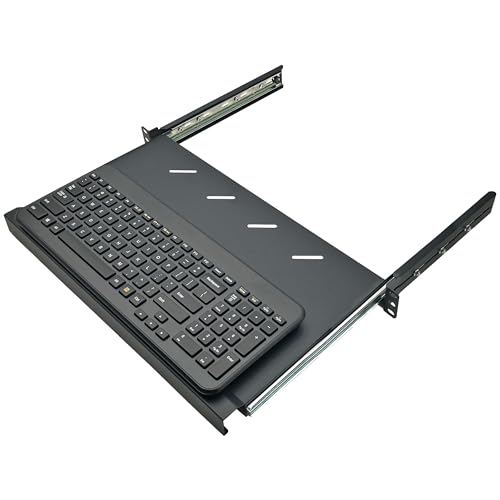
Best for compact 19″ rack setups needing space-saving access. This 1U, fully extendable keyboard tray supports standard 19″ racks and includes a 3-rail sliding mechanism with hardware. It requires more than 10.8 inches of depth to install, and its 10.38″ max extension makes frequent maintenance convenient. Use this when you need an integrated keyboard and control surface without moving heavy equipment.
Limitation: The depth requirement means it may not fit shallower enclosures; confirm available clearance before purchase.
Product D: Suprwin 1U Universal Rack Rails
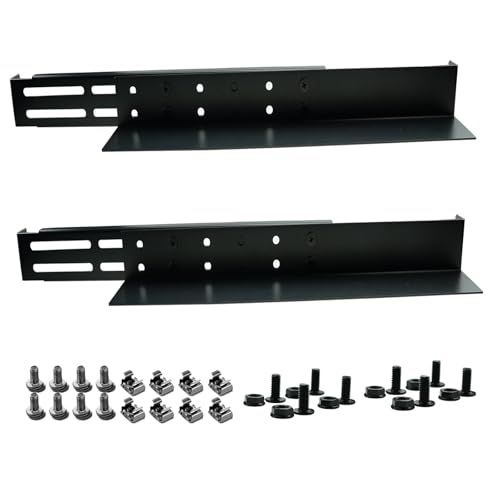
Best for versatile 1U deployments across multiple brands. These universal rails fit 19″ racks and support depths from 17″ to 27.9″, with a high 110 lbs capacity. They are well-suited for standard 1U servers and similar equipment in mixed-brand environments. Choose this if you prioritize a broad compatibility range and solid weight support for compact server rooms.
Limitation: The rails are designed for 1U equipment; for deeper or heavier hardware, verify compatibility with your rack depth and weight distribution to avoid sagging.
Product E: ForoGore 2 Pack 1U Universal Rails

Best for 1U servers requiring universal fit and robust support. The ForoGore rails come in a 2-pack, with a depth range of 16″ to 31″ and a 120 lbs capacity. They comply with standard 4-post rack configurations and support a wide array of brands, including APC, HP, IBM, Dell, and Compaq. This option suits IT closets or data centers that need reliable, heavy-duty rails with flexible depth settings.
Limitation: The package is a two-pack; confirm that your cabinet’s post configuration aligns with 4-post mounting to avoid misalignment during installation.
Buying Guide
What should you consider when choosing rack mount slide rails?
- Chassis size and rack compatibility — Ensure rails support your chassis height (1U, 2U–5U) and that the rack uses standard 19″ mounting rails.
- Depth range — Pick rails that match your cabinet depth or offer adjustable depth to avoid overhang or insufficient extension.
- Weight capacity — Confirm rail load ratings align with your equipment’s weight to prevent sag or failure.
- Extension and sliding mechanism — Ball-bearing slides offer smoother operation, especially in busy maintenance cycles; consider the need for full extension.
- Post configuration — 4-post versus 2-post mounting affects compatibility with your cabinet; verify if rails are designed for 4-post or universal mounting.
- Installation hardware — Check included mounting hardware and additional components needed (brackets, screws, cage nuts) to complete installation quickly.
- Maintenance access — Rails that extend smoothly reduce service time during upgrades and troubleshooting.
How to compare options quickly
- Best for versatility and multiple depths: ForoGore 1U Rails or Suprwin 1U Rails.
- Best for high-extension and easy chassis removal: Rosewill RSV-RL20HV2.
- Best for smooth operation in mixed-brand racks: RackChoice 20″ Rails.
- Best for integrated keyboard access in compact racks: Electriduct 1U Keyboard Tray.
Practical tips for installation
- Measure internal cabinet depth and clearance around rear cables before ordering.
- Plan cable management paths to avoid obstructing rail travel.
- Double-check mounting hole alignment with your rack posts to prevent misalignment during installation.
FAQ
- Q: Do these rails fit all 19″ racks? A: Most are designed for standard 19″ racks with 4-post or universal mounting, but always verify the specific model’s compatibility with your cabinet.
- Q: Can I use these rails for heavy servers? A: Weight capacity varies by model; choose rails that match or exceed your server weight and plan for future expansion.
- Q: Do rails require tools beyond standard rack hardware? A: Most include mounting hardware, but check if you need extra screws or nuts for your cabinet.
- Q: Is full extension necessary for maintenance? A: Full-extension rails simplify maintenance, but partial-extension models can suffice for limited access scenarios.
- Q: Are there rails suitable for mixed-brand racks? A: Yes, universal or adjustable-depth rails are ideal for mixed-brand environments.
- Q: How do I verify depth compatibility? A: Compare the rail depth range to your cabinet’s maximum usable depth, accounting for cable bundles behind the equipment.
Summary Table
| Product | Best For | Depth Range | Weight Capacity |
|---|---|---|---|
| Rosewill RSV-RL20HV2 | Chassis with easy removal | 20″–33.5″ | Up to 77 lbs |
| RackChoice 20″ Rails | Universal 2U–5U racks | 20″ | Depends on model |
| Electriduct 1U Keyboard Tray | Compact 1U access | Not listed (requires 10.8″ depth minimum) | Not specified |
| Suprwin 1U Rails | Universal 1U racks | 17″–27.9″ | 110 lbs |
| ForoGore 2 Pack 1U Rails | 4-post universal 1U mounts | 16″–31″ | 120 lbs |
Add a Comment