Here’s a clear guide to help buyers choose the right precision laser cutting machine. This article highlights five top options, detailing who each model is best for, and why it stands out. Ideal for hobbyists, crafters, and small businesses, these picks balance accuracy, speed, and ease of use. Below, you’ll find a quick comparison table and product-specific insights to support confident decisions.
| Product | Brand | Working Area | Laser Power | Best For |
|---|---|---|---|---|
| BlazeX M3 10W | BlazeX | Limitless desktop scope | 10W | Beginner to intermediate DIY, personalized items |
| Creality Falcon 5W | CREALITY FALCON | 400 × 415 mm | 5W | Medium projects, hobbyists needing speed |
| Artilume U1 | Artilume | 200 × 150 mm | 3000 mW | DIY crafts, small business start-ups |
| Longer Ray5 10W | Longer | 400 × 400 mm | 10W | Small studios, batch-capable projects |
| Twotrees TTS-55 Pro | Twotrees | 300 × 300 mm | 5.5W | Hobbyists, makers, light commercial use |
BlazeX M3 10W Laser Engraver

The BlazeX M3 offers ultra-precision engraving with a 10W laser and 0.01 mm accuracy. It is well suited for beginners who want detailed work on wood, leather, glass, and coated metals, as well as for small-batch production. The device includes a protective enclosure, a honeycomb bed, and a starter kit, which helps users get results quickly and safely.
Best for: beginners and hobbyists who need high detail on a variety of materials and who appreciate an all-in-one starter package. It is especially good for desktop DIY projects and personalized items such as jewelry or small crafts.
Caution: While versatile, users should verify material compatibility for edges or coatings that may affect cutting performance. Ensure proper ventilation during operation.
Creality Falcon 5W Laser Engraver

The Creality Falcon 5W Laser Engraver emphasizes high-precision engraving with a 0.06 × 0.06 mm compression spot and speeds up to 10,000 mm/min. Its large working area (400 × 415 mm) supports bigger projects, and a 32-bit control chip enables fast, consistent performance. Optional add-ons (rotary rollers and raisers) expand versatility for cylindrical or taller pieces.
Best for: users who regularly work with larger pieces and need dependable speed without sacrificing detail. It’s a strong choice for small businesses handling frequent, mid-sized jobs.
Caution: The official data notes high-speed operation; ensure proper cooling and safe operation when running at maximum speeds.
Artilume U1 Laser Engraver

The Artilume U1 combines a compact 200 × 150 mm area with 0.01 mm precision and 3,000 mW output. It ships pre-assembled and supports LightBurn and other common software, making it accessible for beginners and hobbyists. Features include WiFi control via an app and a robust set of supported materials including wood, metal, acrylic, leather, and more.
Best for: newcomers who want a straightforward setup, clear software compatibility, and app-based control. It’s a solid option for small crafts businesses needing reliable, precise output.
Caution: While pre-assembled, check software compatibility with your preferred workflow and ensure your computing device is compatible with the app ecosystem.
Longer Ray5 10W Laser Engraver
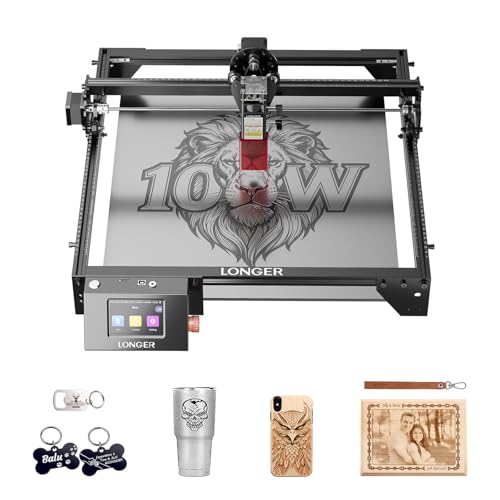
The Longer Ray5 10W model pairs a 10W laser with dual-beam technology and a large 400 × 400 mm area. With engraving speeds up to 24,000 mm/min and 0.01 mm accuracy, it supports high-velocity, detailed work. It also offers multiple connection options including USB, TF card, and WiFi, and supports software like LaserGRBL and LightBurn.
Best for: studios or makers who require fast production, multi-machine control, and flexible connectivity. It’s a fit for small operations looking to scale output without losing precision.
Caution: The ESP32-based control may require careful setup for multi-machine coordination; ensure network stability for offline work when needed.
Twotrees TTS-55 Pro Laser Engraver

The TTS-55 Pro provides up to 5.5W power with a 0.08 mm spot, offering precise engraving on wood, leather, acrylic, and more. Its 300 × 300 mm work area supports hobbyist and light commercial projects, and the device is designed for easy integration of an air-assisted system for cleaner cuts.
Best for: hobbyists who want good detail on moderate-sized pieces and an upgrade path to cleaner cuts with air assist. It’s a practical choice for small makers labs and home workshops.
Caution: The machine’s 0.08 mm spot is slightly less precise than higher-end models; for ultra-fine work, consider models with smaller spots or additional optical upgrades.
Buying Guide: What to Consider When Choosing a Precision Laser Cutter
- Materials and applications: Match laser power and spot size to your primary media. Higher power with a fine spot is ideal for metal etching and deep cuts; softer materials like wood and leather benefit from balanced power and precise focus.
- Working area and scalability: Larger beds enable bigger pieces or batch work. Consider future needs if you plan to expand your line or take on bigger projects.
- Speed vs. precision: Some models prioritize speed (mm/min) while others optimize for micron-level detail. Determine whether throughput or fine detail is your priority.
- Software and compatibility: Ensure your preferred software (LightBurn, LaserGRBL, or vendor-provided tools) works with the device. Check file format support (JPG, PNG, NC, DXF, etc.).
- Enclosures and safety: Enclosed units reduce inhalation exposure to fumes and protect eyes. Look for protective covers and certifications as required for home use.
- Connectivity options: USB, WiFi, and app control affect workflow convenience. Offline operation can be essential for workspaces with network limits.
- Upgrades and add-ons: Rotary attachments, extra lenses, and lift platforms expand capabilities for cylindrical items or taller pieces.
- Maintenance and longevity: Access to spare parts, lens replacement, and airflow components influence long-term usability and cost.
Frequently Asked Questions
- What materials can a precision laser cutter engrave best? – Common materials include wood, leather, acrylic, and coated metals. Your choice depends on laser power, focal spot, and cooling considerations.
- Is a protective enclosure necessary? – Enclosures improve safety by containing fumes and protecting eyes, especially for home workspaces and beginners.
- Can I use these devices for business workstreams? – Yes, many models are suitable for light commercial tasks, provided you align speed, accuracy, and bed size with project needs.
- Do these machines require specialized software? – Most support standard options like LightBurn or LaserGRBL, with some including their own software. Check compatibility before purchase.
- What maintenance steps are typical? – Regularly clean lenses, check air assist/nozzles, inspect belts and alignment, and ensure proper ventilation during operation.
- Are higher wattage lasers always better? – Not always. Higher wattage offers deeper cuts or faster engraving but can increase cost and safety considerations. Choose based on your primary materials and budget.
Add a Comment