The top laser marking machines for metal offer fast, precise engraving on stainless steel, aluminum, and other metals, with options ranging from compact portable units to full industrial systems. This guide helps buyers choose devices tailored to personal projects or small-to-midsize production. The featured picks cover versatility, speed, and accuracy, plus practical trade-offs for different use cases.
Buyer overview at a glance:
| Product | ||
|---|---|---|
| PEKOKO 10W Portable | Beginners and on-the-go marking | Ultra-fast marking on metals with portable design |
| xTool F2 5W IR & 15W Diode Dual | Versatile projects, color marking, and 3D embossing | Dual laser for metal marking and thick-material embossing |
| GWEIKE G2 Pro 30W Fiber | Professional, high-volume metal engraving | High-speed, 0.001 mm accuracy, deep engraving |
| Pixi 1064nm Infrared | Small business personalization | Infrared metal marking with standalone operation |
| MR. CARVE S4-30W | Flexible lens options and LightBurn workflow | Two replaceable lenses for depth and detail |
PEKOKO 10W Portable Laser Marking Machine
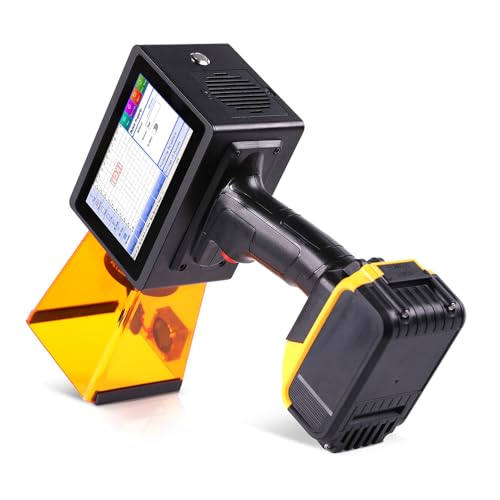
Best for beginners and mobile projects. This unit offers ultra-fast marking on metals such as stainless steel and aluminum, plus plastics and other materials. Its self-contained design includes an integrated battery and protective shield, aiding quick setup and safe operation. The built-in 5″ HD touchscreen provides straightforward control and live preview.
Key considerations: It is primarily a compact device suitable for small batches or occasional custom items. Enabling quick job changes is a strong point, while the lighter wattage means it may not replace larger industrial systems for high-volume production. This model suits hobbyists, small studios, and service-based makers who value portability and fast results.
Best for: quick personalization on the go, small craft projects, and users who need a compact, self-contained laser marker.
xTool F2 5W IR & 15W Diode Dual Laser Engraver

Best for versatile projects and color-capable metal marking. The F2 combines a 5W infrared laser with a 15W diode laser to tackle a wide range of materials, including metal, wood, and plastic, with capabilities for 3D embossing and color marking on metal surfaces. A built-in 50MP camera supports precise alignment, and the machine reaches speeds up to 6000 mm/s for quick turnaround on cards, tags, and small parts.
Best for: users who need both marking depth on thick materials and color/embossing options for metal pieces; ideal for small-batch customization and on-site work. Limitation: dual-laser complexity can require more setup learning compared with single-laser units.
GWEIKE G2 Pro 30W Fiber Laser Engraver

Best for professional, high-speed metal engraving with deep marking. The G2 Pro uses a 30W fiber laser and a galvanometer system to deliver up to 15,000 mm/s engraving with 0.001 mm accuracy. It supports 3D embossing and deep engraving on metal, with a portable handheld design that adds flexibility for varied workspaces. This model is well-suited to jewelry, tags, and high-value metal items requiring precise detail.
Caution: Deep engraving depth and high-speed operation may require careful focus and proper safety practices. This device is best for users who need industrial-level precision in a compact form factor.
Pixi 1064nm Infrared Laser Engraver

Best for jewelry, metal tags, and small personalized gifts. Pixi uses a 1064 nm infrared laser to create clean, fine marks on stainless steel, aluminum, and coated metals. It features a 3.5″ touchscreen and AlgoOS, enabling standalone operation via app control. The compact device is suitable for makers who prioritize precise detail and straightforward workflow in a portable package.
Best for: jewelry makers, nameplates, and small run personalization where fine surface detail matters. Limitation: may require slower marking on highly reflective surfaces without proper surface prep or spray.
MR. CARVE S4-30W Fiber Laser Engraver

Best for multi-lens flexibility and LightBurn compatibility. The S4-30W includes two replaceable lenses (110mm and 200mm) to support deep engraving on metals and large-area tasks. It offers 0.01 mm engraving precision and improved speed through a new chip, plus dual red laser alignment for accurate focusing. The device integrates with LightBurn software, enabling workflows with vector graphics, serial numbering, and QR codes.
Choose this if: you need lens flexibility for depth and area, and you rely on LightBurn for software-driven workflows. Caution: larger engraving tasks may require a stable setup and careful alignment to maintain consistency.
Buying Guide
What material and marking depth do you need?
Metal marking demands different laser wavelengths and powers. Fiber lasers (often 30W and higher) excel at deep, durable marks on metals. Infrared diodes and 1064 nm systems are better for detailed surface marks on metal and coated surfaces. Define the expected depth and the type of metal to guide selection.
Portability vs. production scale
Portable devices suit hobbyists, sign makers, and on-site customization. Industrial or semi-industrial units offer higher speeds, larger working areas, and better repeatability for job shops. Choose according to expected batch sizes and workspace constraints.
Software and workflow compatibility
Software ecosystems like LightBurn, AlgoOS, or standalone control interfaces influence setup time and integration with existing designs. If you already design in a particular software, verify compatibility and whether the marker supports direct import or requires conversion.
Precision, speed, and maintenance
Higher engraving speeds reduce job time but may demand more precise focusing and stable power supplies. Look for features like galvanometers, automatic focusing, and long-term component lifespans (e.g., laser diode stability, lens durability) to ensure consistent results over time.
Safety and compliance considerations
Laser marking carries eye and skin hazards. Ensure machines include protective enclosures, interlocks, and proper certification where applicable. Consider air assist and fume extraction for materials that release fumes or particulates during marking.
Cost vs. value for your goals
Balance upfront cost with capabilities, support, and expected return on investment. For hobby use, low-cost, compact units may suffice. For business use, prioritize speed, repeatability, and service availability.
FAQ
- Q: Can I use these machines on any metal?
A: Most listed units mark common metals like stainless steel, aluminum, and coated metals. Always verify material compatibility for your target alloys. - Q: Do these devices require a computer?
A: Some models support standalone operation via built-in interfaces or apps, while others require a PC or mobile device for design transfer and control. - Q: Is a protective shield or safety gear included?
A: Many portable units come with protective shields and safety switches. Check each product’s specifics for enclosure and PPE recommendations. - Q: What maintenance is typical?
A: Regular lens cleaning, alignment checks, and software updates help maintain engraving quality. Fiber lasers require proper cooling and periodic calibration as part of routine upkeep. - Q: Can I upgrade to higher wattage later?
A: Some systems offer modular or scalable configurations, but most units have fixed laser power and require replacing the laser module for higher power. - Q: Will these machines engrave plastic or glass?
A: Several models handle plastics; glass marking is possible with certain wavelength configurations and coating considerations, but results vary by material and setup.
Add a Comment