Looking for a reliable laser die cutting setup? This guide highlights five top options that balance power, ease of use, and versatility. Best for crafters who want precision and professional finishes without a huge learning curve, or small shops needing capable entry-level machines. Each pick targets different needs—from beginner-friendly all-in-one units to powerful hobbyist-grade cutters. A quick buying table below helps you compare essentials at a glance.
Summary: The five products below cover beginner-friendly to advanced laser die cutting solutions. Artilume U1 is a ready-to-use 7W system with LightBurn compatibility. Carverall X1 offers AI-assisted design and air assist. Ortur Laser Master 2 S2 LU2-10A provides a 10W module and broad software compatibility. LASER TREE’s 4W module focuses on entry-level wood and leather work. CraftGenes and other die cutting machines serve users transitioning from manual to automated processes.
Artilume U1 Laser Engraver & Cutter Machine
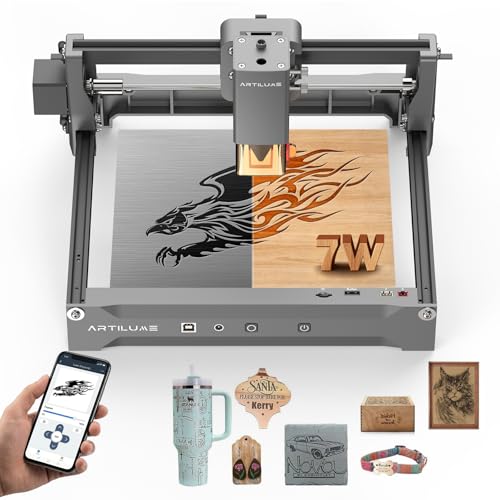
The Artilume U1 is a beginner-friendly laser engraver and cutter with a 200x150mm work area and 7000mW output. It ships pre-assembled and includes comprehensive software options for Windows, macOS, Android, and iOS. The 0.01mm precision supports delicate detail on wood, metal-coated materials, acrylic, and leather. Suitable for hobbyists starting small projects or makers expanding into small-batch production.
Best for: Beginners and small makers who want a turnkey setup with strong educational resources. Why selected: pre-assembled, wide software compatibility (LightBurn, LaserGRBL, CutLabX), and a robust laser system for versatile materials. Limitation: class 1 laser safety requires careful operation, especially with reflective metals and certain plastics.
What makes it work well for you?
- Pre-assembled design saves setup time.
- LightBurn compatibility accelerates design-to-cut workflows.
- 450nm-based modules offer a balance of power and efficiency.
Carverall X1/JL9 20W Laser Engraver and Cutter

The Carverall X1/JL9 is a WiFi-enabled, 20W laser engraver with air assist. It pairs with CutLabX software and LightBurn, enabling remote control via smartphone. The air assist helps reduce burning and yields cleaner edges, especially on wood, leather, and coated surfaces. Its 300x300mm workspace fits a range of sign and panel projects.
Best for: Users who want wireless control and easy file generation from photos or prompts. Why selected: AI design features and air-assisted cutting minimize post-processing. Limitation: higher power requires stricter safety practices and proper ventilation in the workspace.
Why this matters for accuracy and workflow
- Built-in AI design function speeds up creating ready-to-engrave files.
- Air pump reduces scorching, improving edge quality.
- Compatibility with familiar software reduces learning time.
Orturlaser Master 2 S2 LU2-10A 10W

The Ortur Laser Master 2 S2 LU2-10A offers a 10W optical power module with a 390x410mm engraving area. It supports common software like LaserGRBL and LightBurn, with broad OS compatibility, including Mac. The modular design makes assembly straightforward, and the system supports SVG, DXF, JPG, and PNG file formats for versatile projects.
Best for: Informed hobbyists and small studios seeking a capable, adaptable laser cutter. Why selected: higher power for deeper cuts on wood and some plastics, plus broad software support. Limitation: setup and alignment can require careful calibration for best results, and enclosure ventilation is important for safety.
Workflow considerations
- Plan project layers to optimize power and speed.
- Test on sacrificial materials before final passes.
LASER TREE 4000mW Laser Engraver Module
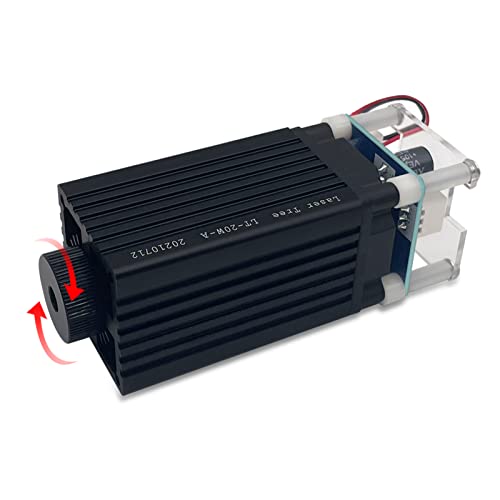
The LASER TREE module features a compact 4W (4000mW) blue diode laser head with adjustable focal length. It cuts through thin plywood in a single pass and is suitable for straightforward engraving on paper, leather, and craft materials. The package includes basic assembly and a 12V power setup, making it accessible for DIY projects and learning the basics of laser cutting.
Best for: Beginners exploring laser cutting on simple materials. Why selected: low entry cost and adjustable focus for better accuracy on small projects. Limitation: limited power restricts cutting thickness and challenging materials beyond wood and leather.
Practical tips for using this module
- Focus adjustment is key for clean edges; align per material thickness.
- Work on light materials first to dial in speed and power settings.
UCEC Magnetic Cutting Mats Kit

While not a laser unit, the UCEC magnetic cutting mats and cutting pads kit complements laser die cutting workflows by stabilizing dies and ensuring clean cuts. This kit includes a magnetic cutting shim and two polycarbonate pads, designed to fit small and medium die-cut machines. It enhances alignment, reduces slippage, and supports precise embossing and die-cutting tasks.
Best for: Users who need stable dies and consistent pressure for hand-guided or manual die-cutting alongside laser projects. Why selected: improves accuracy and repeatability in layered cardmaking and embossing. Limitation: does not provide laser cutting capabilities itself.
Buying Guide: How to Choose the Right Laser Die Cutting Equipment
- Workspace and safety: Do you have proper ventilation and a dedicated enclosure? Higher-powered units need stronger safety measures.
- Material compatibility: What materials will you work with most—wood, acrylic, leather, or metal-coated surfaces? Higher power expands options, but some metals require specialized interfaces.
- Software and workflow: Do you prefer LightBurn, LaserGRBL, or AI-assisted design? Ensure your chosen model supports your preferred tools.
- Resolution and precision: Are 0.01mm or similar tolerances necessary for your projects? Higher precision suits jewelry, signage, and detailed engraving.
- Size and capacity: Consider the workspace dimensions (e.g., 200x150mm vs 390x410mm) and whether you need room for larger pieces.
- Upgrade path and support: Is the device modular or expandable? Look for vendor support and readily available replacement parts.
Frequently Asked Questions
- What is a safe starting wattage for a beginner laser engraver? A beginner-friendly unit around 4W to 7W is typically safe for learning on wood, leather, and plastic, with proper ventilation and eye protection.
- Can I engrave metal materials with these machines? Some units offer metal engraving via higher power or a dedicated interface, but many entry-level machines are best for wood, leather, and coated metals.
- Do I need a dedicated enclosure? Enclosures help with safety and dust control and are recommended for higher-power systems.
- Is software compatibility important? Yes. If you already use LightBurn or LaserGRBL, choose a model that supports them to minimize learning curves.
- What maintenance is required? Regular cleaning of lenses, ensuring proper focus, and replacing worn components like fans or seals as needed keep performance consistent.
- Are these devices suitable for small business use? Yes, many offer reliable repeatability, good edge quality, and file compatibility that suits custom sign making, prototyping, and small-batch orders.
| Product | |||
|---|---|---|---|
| Artilume U1 | 200x150mm | 7000mW | Beginners who want quick setup and broad software support |
| Carverall X1/JL9 | 300x300mm | 20000mW | Wireless control enthusiasts and higher-power projects |
| Orturlaser Master 2 S2 | 390x410mm | 10000mW | Versatile user needing strong power and software flexibility |
| LASER TREE 4W Module | Small modules | 4000mW | Entry-level projects and testing ideas |
| CraftGenes A4 Electric Die Cutting | A4 opening | 200W motor | Card making and scrapbooking with automation |
Notes on Choosing and Using Laser Die Cutting Equipment
- Match power to your typical material thickness and desired finishing. Higher power enables deeper cuts but increases safety requirements.
- Consider how you will design files. If you rely on vector formats (SVG, DXF), ensure software compatibility.
- Think about upgrade options and service. Accessible support and spare parts reduce downtime in a small business.
- Invest in safety gear and a proper enclosure. Eye protection, ventilation, and stable mounting reduce risk during operation.
Add a Comment