Answering the question for builders and designers: these laser engravers and CNC routers offer solid versatility for hobbyists, crafters, and small studios. The top picks cover high-speed laser engraving, offline operation, rotary capabilities, and all-metal CNC construction. This guide highlights which machine fits your typical use case, from wood and acrylic engraving to precision metal work and cylindrical objects.
- Product: LONGER Ray5 10W Laser Engraver
- Product: CREALITY FALCON 10w Laser Engraver
- Product: LUNYEE 3018 PRO MAX CNC Machine
- Product: LONGER Ray5 5W Laser Engraver
- Product: FoxAlien Masuter Pro 3-Axis CNC Router
| Product | Best For | Key Strength |
|---|---|---|
| LONGER Ray5 10W | Pro hobbyists and small studios needing offline work | High speed, large work area, multi-machine control |
| CREALITY FALCON 10w | Users needing rotary engraving and safe setup | Air assist, rotary capability, quick assembly |
| LUNYEE 3018 PRO MAX | Budget-conscious crafters needing a full CNC router | All-metal frame, high Z travel, offline control |
| LONGER Ray5 5W | Beginners or makers prioritizing simplicity | Compact, offline capable, good precision |
| FoxAlien Masuter Pro | Wood, acrylic, and multi-material hobby milling | All-metal, upgrade-ready spindle options |
LONGER Ray5 10W Laser Engraver
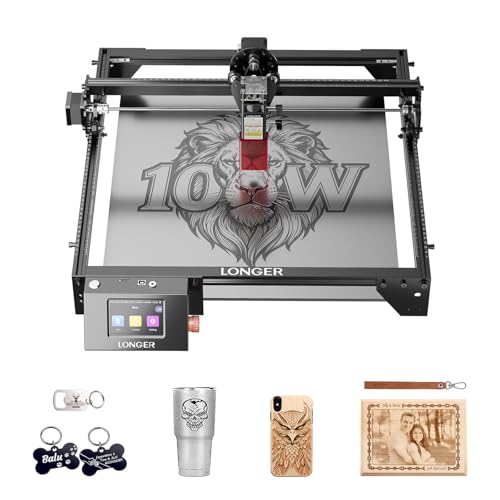
The LONGER Ray5 10W Laser Engraver targets serious hobbyists and small studios needing fast, detailed engraving. It features a 10W laser, 240MHz ESP32, and dual-beam precision engraving for fine lines and sharp details. The large 400 × 400 mm area supports a wide range of materials—wood, metal, acrylic, and glass. With offline use and multiple connections (USB, TF, WiFi, and app control), it suits users who work without constant PC connection or in a shared workshop environment.
Best for: a designer or maker who runs small batches, values high-speed performance, and needs offline capability. The 0.06 × 0.06 mm laser spot helps with intricate patterns. A potential limitation is the complexity of setup through several connection methods, which may require initial familiarization.
CREALITY FALCON 10w Laser Engraver

The CREALITY FALCON 10W Laser Engraver focuses on productivity and safety. It delivers up to 10,000 mm/min engraving speed and can cut through 12 mm wood in a single pass, or process 3 mm black acrylic. The unit includes an air-assist option, USB, WiFi, and a quick assembly process, along with a 4-in-1 rotary kit for cylindrical items. The rotary capability broadens item shapes beyond flat surfaces.
Best for: users who need rapid throughput and the ability to work on cylindrical objects. It’s safer and easier to assemble, with protective features like an anti-UV filter for eye protection. Caution: Class 4 laser power requires careful handling and adherence to safety practices.
LUNYEE 3018 PRO MAX CNC Machine

The LUNYEE 3018 PRO MAX is a compact, all-metal CNC router designed for wood, acrylic, and plastics. It offers a robust 500W spindle substitute power, high-speed travel up to 5000 mm/min, and a GRBL offline control option. The machine emphasizes stability and precision with reinforced aluminum framing and a long Z-axis travel (80 mm) for varied depths. It’s well-suited for small workshops and makers looking for offline operation and upgrade potential.
Best for: hobbyists who want a durable, metal-structured CNC router with offline control and room to expand. Limitation: the upgrade path (e.g., additional 12 mm frame) may require separate purchases and planning.
LONGER Ray5 5W Laser Engraver

The LONGER Ray5 5W laser model offers a balance of high speed and simplicity. With a 5W laser, 0.08 × 0.08 mm spot, and 0.01 mm engraving accuracy, it suits beginners or makers who want solid precision without heavier hardware. The 400 × 400 mm work area remains ample for typical small projects and it supports USB, TF, WiFi, and app-based control for offline use.
Best for: newcomers and small studios seeking an approachable entry into laser engraving with offline capability. Caution: the 5W power means slower material throughput on harder materials compared to higher-wattage models, and users should select materials accordingly.
Twotrees TTC450 Pro All-Metal CNC Router

The Twotrees TTC450 Pro is a capable all-metal CNC router with a capacitive 3.5-inch touch screen and expansion ports for 4th-axis laser and 500W spindle control. It offers a large working area (460 × 460 × 80 mm) and a high-precision Z-axis with 0.0025 mm positioning accuracy. It is compatible with GRBL-based workflows and major design software, making it a strong option for projects requiring multi-axis flexibility.
Best for: users planning larger projects or multi-tool setups and who want strong software compatibility. Caution: the system supports upgrades like a 4th axis or different spindles, which may require extra components and planning.
Twotrees TTS-55 Pro Laser Engraver
The Twotrees TTS-55 Pro Laser Engraver brings a compact yet capable 5.5W laser with upgraded air-assist and a focused 0.06 × 0.46 mm spot. The 300 × 300 mm work area supports a variety of materials including wood, leather, acrylic, and stainless steel. The laser uses advanced compression technology to deliver robust cutting power and sharp engraving detail. It is suitable for hobbyists who want higher precision in smaller projects.
Best for: makers who value high-detail engraving in a smaller footprint and want an integrated air-assisted system. Limitation: the 0.1 mm engraving accuracy notes indicate precision depends on technique and material selection.
Buying Guide
Key considerations when choosing a laser or CNC machine:
- Material compatibility: Decide which materials you’ll primarily work with (wood, acrylic, metal, glass) and pick wattage and optics accordingly.
- Engraving speed vs. precision: Higher speeds are beneficial for production; finer spot size improves detail but may require slower feeds on hard materials.
- Working area: Larger beds enable bigger projects but require more space and power reliability.
- Offline capability: For workshops without constant PC access, offline controls and SD card/USB options are valuable.
- Safety features: Eye protection, emergency stops, and robust enclosures reduce risk when using lasers.
- Upgrade paths: All-metal frames and modular components allow future upgrades (rotary modules, additional axes, higher power spindles).
- Software compatibility: Ensure compatibility with popular programs like LaserGRBL, LightBurn, and GRBL-based interfaces to fit your workflow.
FAQ
- What is the best machine for beginners? The 5W Ray5 model offers a simpler, offline-capable experience with good accuracy for learning the basics.
- Which machine is best for cylindrical objects? The CREALITY FALCON with its 4-in-1 rotary roller is designed for cylindrical items and varied shapes.
- Do all-metal CNC routers require extra upgrades? All-metal frames generally provide stability; some models offer upgrade paths like additional axes or spindles.
- Can I operate these machines offline? Several models support offline control via TF card or standalone software, which is helpful for workshops with limited PC access.
- What safety features should I look for in a laser engraver? Eye protection (UV/IR filtering), emergency stop, and protective enclosures are important safety features.
- Is a larger work area always better? A larger bed increases flexibility but adds to the footprint and may require more power and ventilation.
Add a Comment