Whether you’re building an industrial control system, upgrading legacy equipment, or debugging serial devices, choosing the right USB-to-serial adapter is essential. This guide highlights five top options that balance compatibility, durability, and ease of use. Each product is described with practical buying notes to help you decide who benefits most from each adapter and why it was included here.
Buyer summary table (quick references):
| Product | Best For | Why It Stands Out | Potential Limitation |
|---|---|---|---|
| JESSINIE Industrial USB to Serial Adapter | Small, portable setups | Original FT232RL chipset, adjustable 3.3V/5V output, clear status indicators | Compact design limits port count |
| Gearmo 8 Port USB to Serial Hub | Multi-device, lab, or POS environments | 8 ports, FTDI chipset, per-port TX/RX LEDs | Bus-powered; needs sufficient USB power |
| Gearmo USB to Serial RS-232 Adapter | Single-device RS-232 tasks | LED indicators, easy testing, broad OS support | DB9-only interface |
| innomaker Industrial USB to Serial RS232 | Variable OS environments | High chip compatibility, RTS/DTR support | May be bulkier than ultra-compact adapters |
| Waveshare USB to RS232/RS485/TTL Isolated Converter | High-safety, isolated needs | FPGA protection, aluminium enclosure, auto transceive | Higher cost; isolation adds bulk |
JESSINIE Industrial USB To Serial Adapter

The JESSINIE USB-to-serial adapter uses a genuine FT232RL chipset to maximize stability and compatibility. It is designed for industrial-grade communication between computers and TTL devices. The board includes PWR, TXD, and RXD indicators to clearly show working status, which is helpful during programming and debugging sessions. It supports data rates from 300 bps to 3 Mbps and can be powered via USB 5V. A selectable 3.3V or 5V output makes it flexible for different TTL devices. Best for compact, portable fieldwork or prototyping where a dependable FT232RL-based interface is valued. Caution: the miniature form factor may limit the number of connected devices per setup, so plan cabling accordingly.
Who this is best for: technicians and engineers who need a slim, reliable USB-to-serial bridge for single-device testing or compact deployments. Why selected: it uses a proven FT232RL chipset and provides clear operational indicators for quick status checks.
Gearmo Industrial 8 Port USB To Serial Adapter

This 8-port USB-to-serial hub leverages an FTDI chipset for reliable automatic handshake and broad compatibility with DB9-based devices. It includes high-visibility LEDs to monitor hub power and per-port TX/RX activity, providing immediate feedback on active communications. The hub is bus-powered, removing bulky power bricks, and it maintains robust COM port retention so legacy devices stay mapped to the same port after reconnecting. Best for environments where several RS-232 peripherals must be managed from a single PC. Caution: verify your PC’s USB power budget to ensure all ports stay reliably powered when multiple devices are active simultaneously.
Who this is best for: IT staff and engineers managing multiple serial peripherals, such as POS systems or barcode scanners. Why selected: multi-port capability with clear status indicators simplifies complex deployments.
Gearmo USB To Serial RS-232 Adapter

This adapter provides a straightforward solution for connecting legacy RS-232 devices to modern USB-equipped computers. It features a 5-foot cable, built-in LED indicators for quick testing, and broad OS support thanks to the FTDI chipset. Best for single-device use in industrial, laboratory, or point-of-sale contexts where a reliable RS-232 bridge is required. Caution: a 5-foot cable length may introduce more baggage in tight workspaces; shorter cables are often easier to route in constrained environments.
Who this is best for: technicians needing a dependable, plug-and-play RS-232 bridge for testing and everyday use. Why selected: balanced features and strong cross-platform compatibility make it a predictable choice for standard RS-232 tasks.
innomaker Industrial-Grade USB To Serial RS232 Adapter

The innomaker adapter emphasizes high compatibility across Windows, Mac OS, Android, Linux, and more, including older Windows versions. It uses an industrial-grade FTDI chipset and supports RTS/DTR handshaking, enabling reliable control of RS-232-enabled devices. Best for cross-platform environments or retrofitting mixed-OS labs and workshops. Caution: bulkier than ultra-compact adapters, which may affect portability in tight spaces.
Who this is best for: teams operating across multiple operating systems or legacy testing rigs. Why selected: broad OS compatibility and RTS/DTR support help maintain reliable serial control across diverse setups.
Waveshare USB To RS232/RS485/TTL Isolated Converter

This converter features an aluminium alloy enclosure and embedded protection circuits, including power isolation, magnetical isolation, and TVS diodes, making it well-suited for higher-safety requirements in industrial control equipment. It delivers fast, automatic transceiving across RS-232, RS-485, and TTL interfaces without mutual interference. Best for applications requiring electrical isolation and rugged construction. Caution: isolation and enclosure add weight and cost, which may be overkill for simple desk setups.
Who this is best for: engineers prioritizing electrical isolation and rigid enclosure protection in harsh environments. Why selected: the integrated protective design helps reduce risk in high-noise or high-voltage surroundings.
USB To RS485 Converter Industrial Adapter

This waveshare model combines USB-to-RS485 with onboard protection features, including a TVS diode and resettable fuse. It is designed for stable, bidirectional RS-485 communication in industrial settings. Best for projects requiring robust surge and electrostatic protection. Caution: RS-485 performance can depend on cable quality and network topology; plan your wiring accordingly for best results.
Who this is best for: automation and industrial networking setups relying on RS-485. Why selected: proven isolation and surge protection support reliable operation in demanding environments.
DTECH USB To RS422 RS485 Serial Port Converter
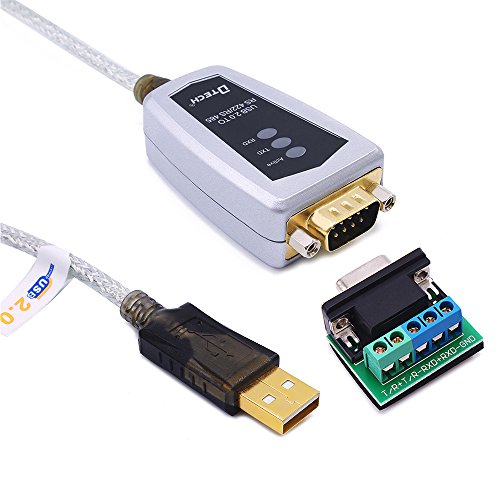
The DTECH adapter provides USB-to-RS485/RS422 conversion with an FTDI FT232 chipset, designed for industrial environments. It includes LED indicators and claims compatibility with Windows, macOS, and Linux. Best for versatile industrial labs that run multiple protocols and need straightforward RS-485/RS-422 bridging. Caution: performance depends on proper handshaking and wiring; misconfigurations can impede communication.
Who this is best for: engineers who need reliable cross-protocol serial bridging. Why selected: broad protocol support and FTDI-based stability suit mixed-application environments.
Buying Guide: Choosing The Right Industrial USB To Serial Adapter
- Interface needs: Do you require RS-232, RS-485, RS-422, or TTL levels? Some adapters cover multiple interfaces, offering flexibility for future projects.
- Chipset reliability: FTDI-based devices tend to offer broad OS compatibility and stable drivers. FT232RL is a common standard in several picks here.
- Protection and isolation: For harsh environments, look for built-in protection such as TVS diodes, fuses, and galvanic isolation. Aluminum enclosures add durability for industrial use.
- Power and portability: USB-powered adapters avoid extra bricks, but multi-port hubs may require higher USB power. Consider your workspace power budget.
- Indicators and testing: Per-port LEDs or built-in testers help confirm activity and simplify troubleshooting in busy setups.
- OS and driver support: Ensure the adapter supports your operating system version, including older Windows, macOS, and Linux if needed.
- Cable length and form factor: Shorter, tighter cabling is easier in tight racks, while longer cables improve reach in sprawling test benches.
Frequently Asked Questions
- What is the main benefit of an FTDI-based USB-to-serial adapter?
– FTDI-based adapters typically offer broad OS compatibility, stable drivers, and reliable data integrity across many serial devices. - Is isolation important for industrial serial connections?
– Yes, isolation protects equipment from voltage spikes and electrical noise, which is crucial in harsh or high-power environments. - Can I use a USB-to-serial adapter for both RS-232 and RS-485?
– Some adapters support multiple interfaces. Check individual product features to confirm supported standards. - Do multi-port USB-to-serial hubs affect performance?
– They can, especially if many ports are active or if power from the USB bus is limited. A powered hub may be necessary in some setups. - What should I consider when buying for Linux or macOS?
– Verify driver availability and cross-platform support; most FTDI-based devices are compatible with major Linux and macOS versions. - When is isolation overkill?
– For simple desk setups with low electrical noise and no high-voltage risks, non-isolated adapters are typically sufficient.
Add a Comment