Answering the search for rugged, panel-mount touch displays, this guide highlights five open-frame or panel-mounted monitors built for industrial settings. Each option targets different use cases—kiosks, automation, digital signage, or control panels—so you can pick the right fit for durability, interaction, and connectivity. The top picks are best for industrial buyers seeking reliable, multi-touch capability, IP65 front protection, and flexible mounting. Below, compare who each monitor is best for and why it stands out.
| Product | Screen Size | Resolution | Protection | Mounting |
|---|---|---|---|---|
| GreenTouch 19″ Front IP65 Panel Rugged | 19 inch | 1280×1024 | IP65 front | Tough metal frame |
| RIUIIN 15.6″ Open Frame PCAP | 15.6 inch | 1920×1080 | IP65 front; IK09 rating | VESA mounting |
| RIUIIN 8″ Open Frame PCAP | 8 inch | 1024×768 | IP65 front; IK09 | VESA mounting |
| GreenTouch 15.6″ High-Res Embedded | 15.6 inch | 1920×1080 | IP65 front | Metal frame |
| Senisway 17″ Open-Frame | 17 inch | 1280×1024 | IP65; IK08 | Open-frame with multiple mounting options |
GreenTouch 19-Inch Front IP65 Panel Rugged Monitor

The GreenTouch 19-inch display uses a robust aluminum frame designed for industrial environments. It supports multi-touch with up to 10 points via Projected Capacitive (PCAP) technology, enabling precise interactions for interactive kiosks, control panels, and POS systems. It includes HDMI, VGA, DVI, and Audio interfaces for flexible professional use. Best for: frontline operators requiring reliable touch input in rugged settings and multiple connection options. Caution: Front IP65 protection is strong, but ensure proper sealing around cable management to maximize protection in dusty environments.
RIUIIN 15.6″ Open Frame PCAP Touch Monitor

This 15.6-inch PCAP monitor offers a 1080p display with 10-point touch, 3mm tempered glass, and IP65 front protection plus IK09 impact rating. It’s a solid choice for industrial kiosks, vending, or HMI panels exposed to dust and moisture. Best for: compact panels where durability and multi-touch precision matter. Caution: Larger installations may require careful cable routing due to multiple input options.
RIUIIN 8-Inch Open Frame PCAP Touch Monitor

With an 8-inch display, this monitor uses G+G 10-point capacitive touch and 3mm tempered glass for IP65 front protection and IK09 durability. It’s suited for compact control panels, vending interfaces, or small HMI touchpoints. Best for: tight-space installations where a rugged, responsive touch display is required. Caution: Smaller screen size may limit detailed UI elements in high-precision tasks.
GreenTouch 15.6-Inch High-Resolution Embedded Monitor

This embedded monitor mirrors the rugged GreenTouch design with a 15.6-inch, 1080p display and PCAP multi-touch up to 10 points. Interfaces include HDMI, VGA, DVI, and Audio for broad compatibility. Best for: embedded control panels or digital signage in industrial settings where a modern appearance matters. Caution: Ensure enclosure design accommodates the front panel’s IP65 protection without obstructing vents or connectors.
BOSUNRE 7-Inch Open Frame Touch Panel Monitor

The 7-inch BOSUNRE display provides 10-point touch with IP65 front protection and IK08 robustness. It features HDMI and VGA inputs, plus VESA bracket mounting for flexible placement. Best for: compact HMI control panels, machine interfaces, or portable kiosks. Caution: Smaller screen may not display detailed dashboards clearly; verify font sizes and UI scale for your use case.
Senisway 17-Inch Industrial Open Frame
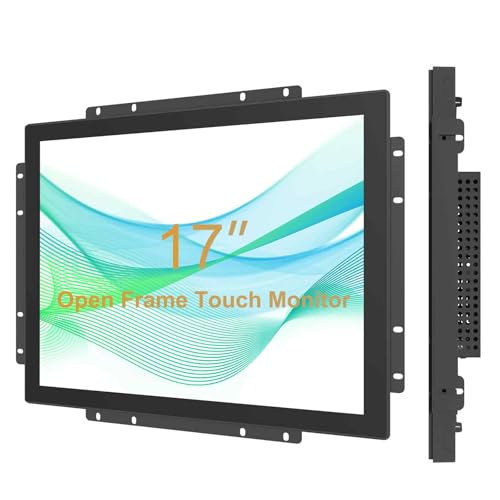
The Senisway 17-inch offers 1280×1024 with a 65% sRGB color space, 10-point PCAP, and front IP65 protection alongside IK08 vandal resistance. It supports flexible mounting and multiple installation methods such as wall, desktop, or recessed setups. Best for: kiosks and digital signage in public or semi-public spaces needing durable, multi-touch interaction. Caution: Open-frame design requires careful enclosure integration to maintain IP65 integrity.
Buying Guide: Key Purchase Considerations
- Touch technology and accuracy: PCAP touch supports multi-touch and precise input; verify the number of touch points your use case requires.
- Front protection: IP65 front rating helps resist dust and water; IK ratings indicate impact resistance. Choose based on expected exposure and cleaning regimes.
- Display size and resolution: Match screen size to user distance and UI complexity; higher resolution improves readability in kiosks and signages.
- Connectivity and mounting: Ensure available inputs (HDMI, VGA, DVI) align with your devices; verify VESA or open-frame mounting compatibility for your enclosure.
- Durability and cooling: Aluminum frames and rugged components support long-term reliability in harsh environments; consider fanless designs where dust is a concern.
- Longevity and availability: Industrial monitors with longer product life cycles help reduce replacement risks in critical deployments.
FAQ
- What does IP65 protection mean for an industrial touchscreen?
It means the front panel is protected against dust and water jets, helpful in dusty factories or public kiosks. - Are open-frame monitors suitable for wall installations?
Yes, with appropriate mounting brackets and enclosure design to preserve IP ratings. - Is multi-touch always better for industrial apps?
Multi-touch improves interaction for complex UI tasks, but may add cost; choose based on required gestures and reliability needs. - What should I consider when choosing a monitor for vending machines?
Look for IP65 front protection, IK ratings, compact size, reliable 10-point PCAP touch, and robust inputs like HDMI/VGA. - Do these monitors require special drivers?
Many use standard PCAP touch drivers; verify compatibility with your operating system and kiosk software. - Can these monitors be used in outdoor environments?
Front IP65 protection helps against dust and water, but consider ambient temperature and sunlight readability for outdoor use.
Add a Comment