Answering the question, these industrial LCD touch screens are designed for reliability in harsh environments, offering rugged builds, multi-touch PCAP capabilities, and multiple video interfaces. They’re best for factory floors, kiosks, outdoor signage, and control rooms where durability and precise touch input matter. The top picks span front-waterproof, open-frame, and outdoor-ready displays to fit varied industrial settings.
| Product | Size / Type | Best For | Key Interfaces |
|---|---|---|---|
| GreenTouch 10.1″ Front Waterproof | 10.1″ PCAP | Wet or dusty environments; compact control panels | HDMI, VGA, DVI, Audio |
| GreenTouch 23.8″ Open Frame | 23.8″ PCAP | Industrial kiosks and control rooms with larger display | HDMI, VGA, DVI, Audio |
| GrenTouch 21.5″ Aluminum Embedded | 21.5″ PCAP | Industrial desktops and embedded setups | HDMI, VGA, DVI, Audio |
| GreenTouch 19″ High Brightness | 19″ PCAP | Outdoor or bright environments | HDMI, VGA, DVI, Audio |
| VSDISPLAY 12.1″ Industrial | 12.1″ PCAP | Compact industrial panels and mounting | VGA, DVI |
GreenTouch 10.1 Inch Front Waterproof Industrial Open Frame PCAP Touch Screen LCD Display Monitor
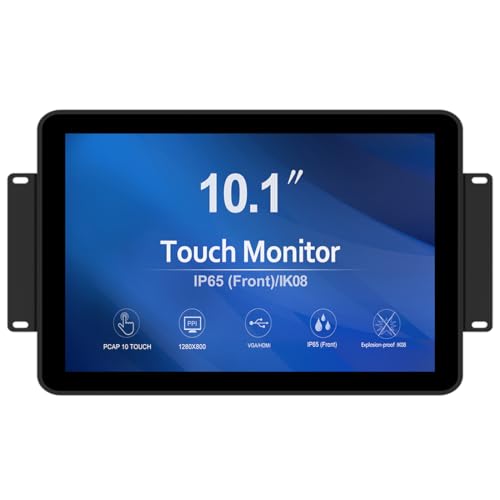
Best for compact control panels in dusty or wet environments. This 10.1-inch PCAP touch screen supports 10-point touch for accurate multi-touch input. It features a tempered cover glass for vandal resistance and front IP65 water resistance, making it suitable for maintenance bays or machine enclosures.
- Touch: 10-point PCAP
- Front protection: IK08 vandal-proof, 3 mm tempered glass
- Interfaces: HDMI, VGA, DVI, Audio
Consider this if you need a compact, rugged display with full connectivity in a dirty or wet area. Limitation: front IP65 protection does not guarantee full environmental sealing behind the panel.
GreenTouch 23.8 Inch Open Frame PCAP Touchscreen Monitor

Designed for industrial-scale display needs, this 23.8-inch open-frame monitor provides large, precise multi-touch input on a robust platform. It’s best for kiosks, control stations, or POS systems that require clear visibility and easy touch interaction in busy environments.
- Touch: 10-point PCAP
- Open-frame design for integration
- Interfaces: HDMI, VGA, DVI, Audio
Choose this if you need a larger touch surface with strong durability and flexible mounting. Caution: open-frame mounting requires proper enclosure and weatherproofing in outdoor or exposed areas.
GreenTouch 21.5 Inch Aluminum Embedded PCAP Touchscreen Monitor

This embedded 21.5-inch PCAP touchscreen is ideal for industrial machines and embedded control panels. Aluminum construction offers solid durability and a clean, professional look for industrial environments requiring precise multi-touch input and multiple interfaces.
- Touch: 10-point PCAP
- Aluminum frame for rugged use
- Interfaces: HDMI, VGA, DVI, Audio
Best for integrated control panels and compact industrial workstations. Limitation: embedded design requires careful enclosure and mounting planning to protect against dust and moisture in some settings.
GreenTouch High Brightness 19 Inch Open Frame PCAP Touchscreen Monitor

Designed for outdoor and bright environments, this 19-inch PCAP touchscreen delivers 1000 nits of brightness for clear visibility in direct sunlight. It’s suitable for outdoor kiosks, control panels near loading docks, or outdoor industrial displays.
- Brightness: 1000 nits
- Touch: 10-point PCAP
- Interfaces: HDMI, VGA, DVI, Audio
Choose this if you need legible screens in bright conditions. Limitation: outdoor performance relies on proper sealing and weatherproofing in the final enclosure.
VSDISPLAY 15 Inch 1000 Nits Outdoor Industrial Touch Screen LCD Monitor

This 15-inch industrial display features 1000 nits brightness and 4:3 aspect ratio for outdoor or high-glare settings. It supports VGA and DVI input and offers a robust platform for outdoor kiosks or harsh-environment dashboards.
- Brightness: 1000 nits
- Touch: 10-point PCAP
- Interfaces: VGA, DVI, Audio
Best for outdoor installations where screen clarity under direct sunlight matters. Limitation: may require protective housing for long-term exposure to the elements.
Buying Guide: Key Considerations for Industrial LCD Touch Screens
What size and form factor do you need? Industrial displays range from compact 10.1 inches to large 23.8 inches. Open-frame vs. mounted enclosures impact how you integrate the screen into existing hardware. Consider whether you need an embedded chassis, or a display that fits a standard monitor footprint.
How rugged must the display be? Look for PCAP multitouch, vandal-proof glass (IK08), and IP ratings for front protection. If the device operates in dusty or wet environments, IP65 front sealing or full enclosure sealing may be necessary.
What about brightness and readability? Outdoor or bright indoor spaces benefit from high brightness (up to 1000 nits) and wide viewing angles. IPS panels help preserve color accuracy across wide angles.
Which interfaces are required? Ensure the model offers your needed video inputs (HDMI, VGA, DVI) and audio if your application uses speakers or alerts. USB connectivity for power or touch data can simplify wiring on smaller devices.
Touch capabilities and latency matter. PCAP touch supports multiple touch points and smooth interaction for kiosks and control panels. Consider the software compatibility with your operating system and driver support.
FAQ
What is the difference between open-frame and integrated displays?
Open-frame displays are designed to be mounted inside an enclosure, offering flexibility but requiring proper protection from dust and moisture. Integrated displays come with built-in casings or bezels and often include sealing and mounting hardware.
Do these displays support multi-touch?
Most options listed include PCAP touch with up to 10 points, enabling precise, multi-touch input for interactive applications.
Are these displays suitable for outdoor use?
Several models offer high brightness and outdoor-readable panels. Verify weatherproofing, sealing, and enclosure ratings for long-term outdoor deployment.
What should I consider for mounting?
Consider VESA patterns (e.g., 75x75mm, 100x100mm) and wall-mount or stand options. Some models include mounting holes or are designed as open-frame solutions that integrate into custom housings.
Is USB power required for touch functionality?
Many models use USB for touch data and power, simplifying the wiring in compact installations. Always check the combined power and data requirements for your setup.
Final Notes
These industrial LCD touch screens provide options across compact to large formats, open-frame to embedded designs, and indoor to outdoor capabilities. Selecting the right model depends on environmental exposure, required brightness, mounting, and input interfaces. The combination of rugged construction, multi-touch input, and flexible connectivity will support a wide range of industrial applications—from kiosks to control panels and outdoor signage.
Add a Comment