When choosing an industrial keyboard and mouse, durability, water and dust resistance, and reliable wired or wireless connections matter most. This guide highlights five proven options ideal for harsh workplaces, medical settings, and manufacturing floors. Each product is evaluated for who it’s best for, plus practical trade-offs so buyers can compare quickly.
| Product | Best For | Key Benefit |
|---|---|---|
| DSI Compact LED Backlit Keyboard with Integrated Mouse Button IP68 | Harsh environments | IP68 sealing and rugged durability |
| E-SDS Industrial Machine Keyboard with Touchpad | Industrial machinery | Integrated touchpad and robust construction |
| Global Industrial Folding Keyboard & Mouse Tray | Station setups | Built-in wrist-rest and adjustable mounting |
| Business offices | Aluminum body with 2.4G and Bluetooth | |
| Compact setups | Rechargeable and single USB receiver |
DSI Compact LED Backlit Keyboard with Integrated Mouse Button

Best for: harsh environments and medical settings where moisture, dust, and temperature fluctuations are common. The DSI model is IP68 certified, fully sealed, and washable, with an integrated touchpad mouse. It’s designed to withstand temperatures from -20℃ to +60℃ and features over 10 million actuations for long life. The compact tenkeyless layout helps save space on crowded workstations.
Why selected: It combines a durable, sealed keyboard with a built-in pointing device in one package, reducing loose peripherals and cleaning complexity. The integrated design minimizes gaps where contaminants can accumulate, making it suitable for cleanrooms or field operations that require easy disinfection.
Caution: The compact form factor may limit full-key travel for users who prefer larger keyboards. Ensure compatibility with your mounting scheme if space is constrained.
E-SDS Industrial Keyboard with Touchpad
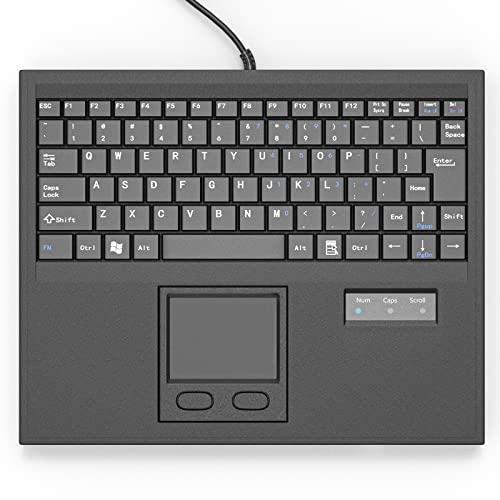
Best for: industrial machinery and factory floors that require a robust wired setup. The E-SDS keyboard includes a touchpad mouse, a design focused on minimizing noise from key posts and friction. It is aimed at environments where consistent, reliable keystrokes matter and where dedicated tactile feedback is valued for operator efficiency.
Why selected: The integrated key body slide and durable construction help reduce mechanical wear in high-usage settings. The included USB interface supports straightforward integration with industrial controllers and PCs alike.
Caution: Being a wired keyboard, it lacks wireless flexibility which may be less convenient for some bench stations or clean-room workflows requiring motion between equipment. Check cable length and routing needs before purchase.
ProtoArc KM310 Mechanical Keyboard and Mouse

Best for: business environments that want a premium, multi-device wireless solution. The ProtoArc KM310 supports 2.4G and Bluetooth, connects up to three devices, and features an aluminum chassis with a modern aesthetic. It emphasizes quiet, linear key switches suited for office productivity and professional use.
Why selected: The dual connectivity and multi-device switching reduce desk clutter and simplify workflow across devices. Its solid construction and space-efficient footprint make it a strong choice for executives or shared workspaces.
Caution: Gaming is not recommended, and some users may prefer tastier tactile feedback if coming from traditional mechanical keyboards. Ensure device compatibility with your OS and Bluetooth policy in your environment.
Arteck 2.4G Wireless Keyboard and Mouse Combo
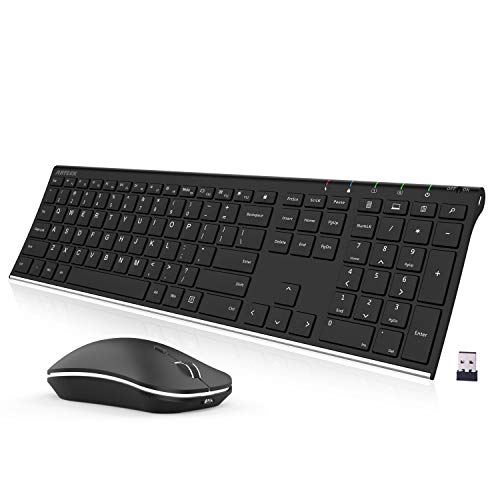
Best for: compact or mixed-use desks needing a rechargeable, all-in-one wireless pair. Arteck provides a single USB receiver, a rechargeable battery, and a straightforward setup that makes it easy to deploy across several desks or teams.
Why selected: The long-life rechargeable battery reduces ongoing costs and maintenance. A single receiver helps limit USB port usage, which is helpful on slim laptops or thin clients used in field offices.
Caution: It’s a consumer-oriented option; if extreme ruggedness or IP ratings are required, consider more industrial designs. Range and key feel may vary with usage conditions.
Buying Guide
Key considerations when selecting an industrial keyboard and mouse set include environment and durability, connectivity type, and ergonomic needs. Use these questions to compare options:
- What is the environment like? Do you need IP-rated sealing, waterproofing, or dust resistance?
- Is a wired or wireless setup preferable for your workspace and workflow?
- How important are integrated features, like a touchpad, media controls, or a numeric keypad?
- Will the device be shared across multiple stations or devices, requiring cross-device switching?
- What about cleaning routines and disinfecting requirements?
Comparison tips: For harsh environments, prioritize IP66/IP68 sealing and sealed surfaces. For cleanrooms or medical spaces, look for easy disinfection and minimal crevices. If desk space is limited, consider compact or integrated designs. For multi-device workflows, a wireless or Bluetooth-capable keyboard with a unified USB receiver can reduce clutter.
FAQ
- What makes an industrial keyboard different from a consumer keyboard?
- Are IP68 keyboards always waterproof?
- Is wireless problematic in manufacturing settings due to interference?
- Can I use a single keyboard with multiple mice?
- Which maintenance steps extend keyboard longevity in dirty environments?
- Do these keyboards require special drivers or software?
Add a Comment