If you’re shopping for an industrial inkjet label printer, you’re looking for durability, speed, and clear, long-lasting labels. This guide highlights five top-performing models suited for tough job-site conditions, fast batch printing, and versatile materials. Whether you’re labeling cables, packaging, or inventory, these devices are targeted to professionals in manufacturing, logistics, and field service. The following table summarizes each pick to help you compare at a glance.
| Product | |||
|---|---|---|---|
| Makeid D50 Industrial Label Printer | 2″ print head; automatic cutter; battery included | ||
| JetPrintco 0.5″ Handheld Inkjet Printer | 0.5″ print height; 42ml ink; 16+ hours battery | ||
| Brady M410 Handheld Label Printer | 1″ labels; edge-to-edge printing | ||
| iDPRT Industrial High-Speed Thermal Printer | 6 ips; up to 4.25″ labels; USB/Ethernet | ||
| Makeid P31S Portable Label Printer | 1″ print head; battery power |
Note: All models listed are designed for industrial use, offering robust construction and media compatibility. The best choice depends on print width, portability, and the range of materials you need to mark.
Makeid D50 Industrial Label Printer

Two-inch print head makes this model versatile for various applications, from cable and data labeling to asset tracking and warehouse marking. It uses a thermal transfer process with 300 DPI, delivering sharp text and long-lasting labels that resist fading for up to five years. A built-in automatic cutter simplifies bulk labeling, and the cartridge design enables quick consumable changes in about five seconds. This makes the D50 a strong option for job sites and maintenance crews that need fast throughput without sacrificing label quality.
Best for: professionals who need on-site versatility and durable labels across multiple material types. Better for: environments with mixed labeling tasks, where quick changes and durability matter. Choose this if: you require a robust, self-contained system with rapid media changes. Caution: ensure you have compatible label stock and ribbon supplies on hand to maximize uptime.
JetPrintco 0.5 Inches Print Height Intelligent Handheld Inkjet Printer

This ultralight handheld model weighs only 390 g and runs over 16 hours on a single charge. It features a 0.5-inch print height and a 42 mL fast-drying ink cartridge, providing colorful, crisp output on plastic, cartons, metal, glass, and more. The 300-nozzle system supports various surfaces, including curved ones, making it ideal for on-the-go labeling tasks at warehouses, manufacturing floors, and field sites. A wrist strap helps prevent drops in busy environments.
Best for: technicians and packagers requiring mobility and long battery life. Better for: small- to mid-sized labeling jobs where weight and speed matter. Choose this if: you need a package that travels with you and prints quickly on diverse surfaces. Caution: for heavy-duty continuous labeling, plan for frequent cartridge changes and battery management.
Brady M410 Handheld Portable Industrial Label Printer

The Brady M410 supports pre-sized or continuous 1″ wide labels with edge-to-edge printing and offers a broad library of materials with more than 100 cartridges. Its easy-swap locking mechanism simplifies cartridge changes, and a viewing window helps users monitor installed supplies. The model is well-suited for data communication, electrical, and lab labeling tasks, particularly when you need a reliable handheld device with a wide material range.
Best for: professionals who label many different materials and need reliable cartridge handling. Better for: on-site labeling where quick material changes and visibility of consumables are beneficial. Choose this if: you want a robust system with broad media compatibility. Caution: ensure your chosen materials are compatible with the cartridge system and device tolerances.
iDPRT Industrial High-Speed Thermal Printer
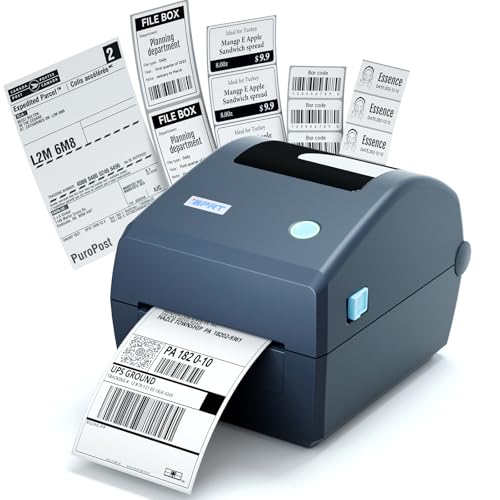
This professional-grade thermal printer is engineered for busy settings with USB connectivity and supports 1″ core media up to 4.25″ wide and 5″ roll diameter. It delivers up to 8 inches per second with 203 DPI resolution, providing crisp shipping and inventory labels, barcodes, and receipts. The setup is designed for plug-and-play use, with a power adapter and USB connection, making it suitable for offices, warehouses, and retail environments where speed and reliability matter.
Best for: high-volume environments needing fast, clear outputs. Better for: users who require straightforward USB/Ethernet connectivity and dependable performance. Choose this if: you prioritize speed and durability for daily heavy labeling. Caution: ensure your label stock matches the 4.25″ width limit before purchase.
Makeid P31S Portable Industrial Label Printer

The P31S offers a 1″ print head with Bluetooth connectivity and a robust 2600mAh battery, supporting up to 90 days of use on a single charge and printing up to 100 labels per minute. It supports a wide range of tapes, including self-laminating, nylon, PET, and heat shrink tubing. The app-based workflow enables templates and bulk data import for efficient on-site labeling, with up to 300 dpi resolution for sharp text and symbols.
Best for: professionals who need high-detail labels on-site and a broad media ecosystem. Better for: field labeling where Bluetooth connectivity and rapid throughput matter. Choose this if: you value a large template library and on-demand data import. Caution: verify battery life in extreme temperatures and ensure compatibility with your label stock choices.
Buying Guide: Key Considerations for Industrial Inkjet Label Printers
What print width and media types do you need?
Industrial label printers vary in maximum print width—from 0.5″ to 2″ (and beyond). Consider the widest label you will print and choose a model that supports your typical media, including heat-shrink tubing, self-laminating tape, and standard label stock.
Mobility vs. fixed installations
Handheld devices excel in fieldwork and on-site labeling, while desktop or belt-mount printers suit warehouse desks and production lines. If you move a lot, prioritize battery life, weight, and Bluetooth or Wi-Fi connectivity.
Print speed and durability
Speed matters for bulk labeling, but durability should not be sacrificed. Models with thermal transfer (ribbons) tend to offer longer-lasting labels than direct thermal options in harsh environments. DPI quality affects readability at distance and in dim lighting.
Media compatibility and cartridges
Check the range of compatible tapes, ribbons, and cartridges. A broad media ecosystem reduces downtime due to stockouts. Look for quick-change cartridges and clear status indicators to minimize on-site maintenance time.
Connectivity and software support
USB, Ethernet, and Bluetooth are common. For on-site data-heavy labeling, apps that support templates, bulk imports, and barcodes/QR codes can dramatically improve accuracy and speed. Ensure the device aligns with your existing workflows.
Support, warranties, and serviceability
Industrial devices benefit from local service options and readily available replacement parts. Assess warranty terms and whether spare parts are easily sourced to minimize downtime.
Frequently Asked Questions
- Do industrial inkjet printers require special ink? Most use fast-drying, solvent-based or resin inks suitable for multiple surfaces; verify compatibility with your materials and storage conditions.
- Is a handheld model enough for warehouse labeling? For large-volume labeling, a desktop or portable handheld with efficient media options often provides better throughput and flexibility.
- What label durability should I expect? Thermal transfer labels tend to endure more wear, fading, and moisture exposure than direct thermal prints, making them preferable in harsh environments.
- Can these printers print on heat shrink tubing? Some models support heat shrink-compatible media; confirm the exact media library before purchasing.
- Do these devices require ongoing maintenance? Regular cartridge changes, cleaning contacts, and battery checks are typical; select models with easy-access consumables and clear indicators.
- Are there software options for bulk label creation? Yes, many devices offer companion apps or software that support templates, barcodes, and bulk data imports for efficient on-site labeling.
Add a Comment