Answering the need for rugged, integrated touch-enabled computing, these industrial all-in-one PCs combine a touchscreen panel with a compact computer in a single unit. They’re best for manufacturing floors, kiosks, warehousing, and control rooms where reliability, easy maintenance, and space savings matter. The top five picks here emphasize fanless designs, Windows or Android operating systems, and robust connectivity to suit different workflows while remaining straightforward for IT deployment. The table below compares the five models at a glance to help you decide quickly.
| Product | OS | Display | CPU | RAM / Storage | Best For |
|---|---|---|---|---|---|
| OuuOee All-in-One Panel PC 15.6″ | Windows 11 Pro | 15.6″ 1920×1080 IPS | Intel Celeron N5095 | 8GB / 128GB | Industrial control and data entry |
| 15.6″ All-in-One Desktop PC (N5095) | Windows 11 Pro | 15.6″ FHD IPS | N5095 | 8GB / 128GB | Office, automation, kiosk |
| 15.6″ All-in-One Industrial Panel PC (RK3399 Android) | Android 12 | 15.6″ FHD | RK3399 | 4GB / 64GB | Rugged Android deployments |
| All-in-One Industrial 13.3″ Panel PC | Win11 Pro | 13.3″ FHD IPS | Intel Celeron N5095 | 8GB / 128GB | Compact, embedded tasks |
| 21.5″ All-in-One Android Panel PC | Android 12 | 21.5″ FHD IPS | RK3399 | 4GB / 64GB | Large-display workflows |
OuuOee 15.6″ All-in-One Panel PC—Windows Pro

Best for: Industrial operators who require Windows 11 Pro, reliable multitasking, and a fanless design. The 15.6-inch panel runs on an Intel Celeron N5095 with 8GB RAM and 128GB storage, providing a balanced mix of performance and energy efficiency for control tasks, data entry, and factory software suites. The panel supports wet hands and gloves, which is crucial on factory floors.
Why selected: This unit combines a robust industrial chassis with a full Windows environment, enabling familiar software ecosystems and straightforward IT management. The fanless operation reduces noise and dust intake, important in sensitive environments.
Limitation: Storage space is fixed at 128GB; consider expanding via available interfaces if large datasets or multiple applications are needed concurrently.
15.6″ All-in-One Desktop PC with N5095—Windows Pro
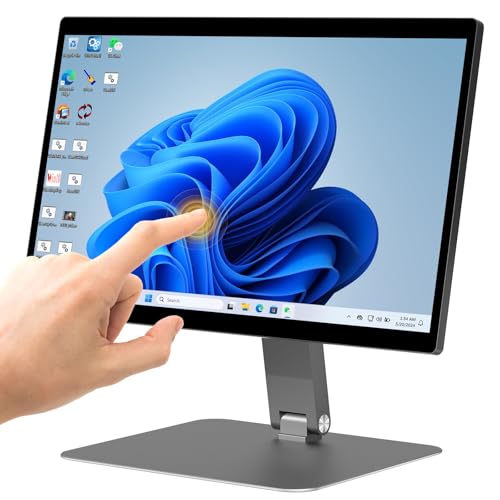
Best for: Offices or warehouses needing a compact, adjustable touchscreen with a desktop-like experience. The integrated 15.6-inch FHD IPS display supports a 10-point touch, and the triple-position quick adjust (360° rotation and 180° folding) makes demonstrations and multi-person collaboration easy.
Why selected: It offers a strong balance of performance with a flexible form factor, enabling landscape or portrait use and space-saving setups. The N5095 processor provides solid multitasking for common automation and kiosk tasks.
Limitation: The design emphasizes versatility; users seeking a purely rugged, sealed environment should review ingress protection and environmental ratings for their exact setting.
15.6″ Android Panel PC—RK3399, Fanless

Best for: Industrial environments where Android-based interfaces and quick app deployment are preferred. The 15.6-inch FHD touch display, 4GB RAM, and 64GB storage suit control panels, kiosks, and field data collection. The device runs fanless for quieter operation in busy facilities.
Why selected: The Android platform can simplify app distribution and updates in some workflows without Windows licensing considerations.
Limitation: Limited RAM and storage compared to Windows counterparts may constrain heavy multitasking or large data sets.
13.3″ All-in-One Panel PC—N5095, Win11 Pro

Best for: Compact embedded tasks where space is at a premium but Windows 11 Pro is still required. The 13.3-inch panel uses a fanless N5095 platform with 8GB RAM and 128GB storage for dependable operation in tight spaces.
Why selected: The smaller footprint makes it suitable for control rooms, elevator kiosks, and specialty machinery where mounting space is limited.
Limitation: The smaller display may limit readability for some users or tasks that require more screen real estate.
21.5″ Android Panel PC—RK3399, Large Touch
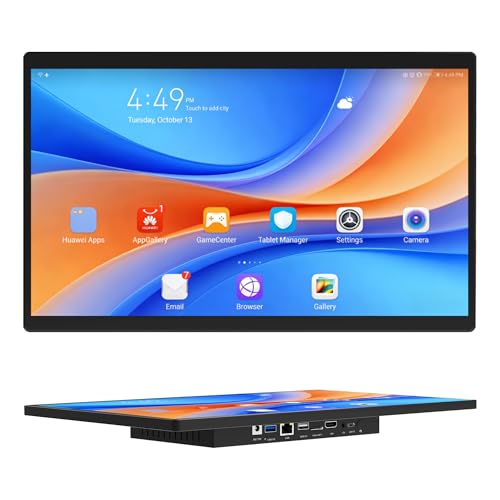
Best for: Large-screen workflows in bars, warehouses, or public information points where Android-based apps run on a big touchscreen. It uses RK3399 with 4GB RAM and 64GB storage, and it supports reliable connectivity with modern wireless options.
Why selected: The expansive display improves operator visibility and multi-person interaction without excess desk space consumption.
Limitation: Android-based systems may require more frequent app updates and may lack the broader enterprise IT controls found in Windows environments.
Buying Guide
What should you consider when choosing an industrial all-in-one touch screen PC?
- Operating System: Choose Windows if you rely on standard business software, or Android if you want quick app deployment and simpler IT management on select tasks.
- Display Size and Touch: Bigger screens improve visibility for complex dashboards; ensure the touch surface supports gloves or wet conditions if needed. Look for 10-point touch for precise multitouch control.
- Processor and RAM: For heavy multitasking or data processing, prioritize multi-core CPUs (e.g., N5095) and at least 8GB RAM. For lighter control tasks, 4GB may suffice with Android.
- Enclosure and Durability: Fanless designs reduce dust intake and maintenance. Consider environmental specs (temperature, ingress protection) and mounting options (VESA, wall, or desk).
- Storage and Expandability: 128GB is common, but plan for potential expansion or external storage if your software requires large datasets.
- Connectivity: Ensure Gigabit Ethernet and multiple USB/RS232 ports meet your peripheral needs. Wireless options (Wi‑Fi 5, Bluetooth) improve flexibility on the floor.
Frequently Asked Questions
- What is an industrial all-in-one touch screen PC?
– It’s a single-unit computer with an integrated touchscreen display designed for industrial environments, often fanless and rugged for reliability on the factory floor. - Is Windows or Android better for industrial touch panels?
– Windows offers broader software compatibility and IT control; Android provides simpler app deployment and potentially lower licensing costs. - Do these devices support glove use?
– Many models advertise multi-point touch capable of wet hands or gloves; verify the specific device’s touch technology before purchasing. - Can I mount these units in a kiosk or workstation?
– Yes, most models support VESA mounts or can be placed on a stand; check available mounting options and power input specs. - How much storage do these panels typically include?
– Most come with 128GB SSD or eMMC; some entries offer 64GB while others may allow expansion via SD card or USB drives. - Are these panels suitable for harsh environments?
– Many are designed to operate across wide temperature ranges and feature rugged enclosures; confirm the exact specs for your environment.
Add a Comment