Answering the question “which folding and inserting machine should I buy?”, this guide highlights reliable options for different needs—from high-volume office use to home craft projects. The top picks cover automatic folding, booklet binding, and manual creasing. Right here you’ll find which machine is best for daily mail tasks, brochure creation, or DIY invitations, along with concise pros, limitations, and practical buying tips.
Summary table of selected products
| Product | Best For | Key Benefit |
|---|---|---|
| United Office F100 Automatic Paper Folding Machine | Offices, schools, churches | High-speed, 200-sheet hopper, multiple fold types |
| CGOLDENWALL Booklet Maker A3 | Factories, schools, offices | All-in-one folding and stapling with various sizes |
| Martin Yale P6500 | Desktop, small mailrooms | Tri-fold and half-fold up to 1,800 sheets/hour |
| Mxmoonant Foldable Manual Creasing Machine | Home studios, crafts | Portable, handles up to 300 gsm, compact storage |
| Blisiour Booklet Maker A3 | Print stores, offices, schools | 2-in-1 folder and stapler for booklets |
United Office F100 Automatic Paper Folding Machine

The United Office F100 is designed for fast, hands-off folding in busy environments. It processes up to 156 sheets per minute and supports letter and legal sizes, making it suitable for offices, schools, and churches that regularly mail out invoices or notices. The hopper holds 200 sheets, enabling longer runs with minimal reloading. It supports C, Z, Half, and Double Parallel folds for versatile output, ensuring professional results for a range of documents.
Best for: medium-to-high volume settings needing reliable automatic folding with multiple fold styles. Choose this if you need quick setup and crisp output with minimal manual handling.
Caution: Large batches will require occasional alignment checks to maintain consistent folds across many sheets.
CGOLDENWALL Booklet Maker A3 Folding Saddle Stitch

The CGOLDENWALL booklet maker combines folding with stapling in one device. It supports multiple operation modes, including folding and stapling, folding alone, or stapling alone, and accommodates paper sizes up to A3 (11.7″ × 16.5″). It can handle up to 20 sheets of 70g paper for binding and 17 sheets for folding, making it versatile for manuals, brochures, and invitations in offices, schools, and churches.
Best for: users who need a multifunction booklet maker that can quickly switch between folding and stapling for professional-looking booklets. Better for small-to-medium batch jobs than high-volume runs.
Caution: Some setups may require time to adjust paper sizes and binding positions for optimal results.
Martin Yale P6500 Paper Folding Machine

The Martin Yale P6500 is a desktop folding machine that handles up to 1,800 sheets per hour. It offers manual feed with automatic operation, featuring tri-fold and half-fold options for letter-size paper. Its compact footprint makes it suitable for small mailrooms, offices, and classrooms while enabling consistent, predictable folding workflows for routine document handling.
Best for: small offices or schools that need a dependable, high-output desktop option without complex setup. Choose this if you want predictable operation and simple use.
Caution: As a desktop unit, it’s best for moderate volumes rather than heavy-duty production runs.
Mxmoonant Foldable Manual Creasing Machine
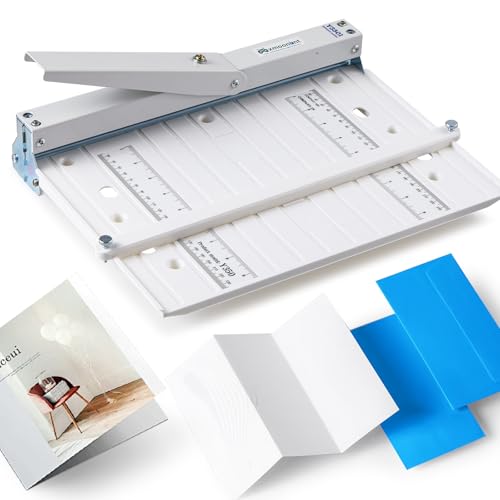
The Mxmoonant folding creaser is a fold-friendly tool designed for home studios and craft spaces. It supports paper up to 13 inches wide and up to 300 gsm, making it ideal for invitations, greeting cards, and DIY covers. Its foldable design stores compactly, and stainless steel creasing blades create clean creases without cracking paper.
Best for: crafters and hobbyists who need a portable creasing solution for handmade cards and invitations. Choose this if you value a compact, home-friendly tool with smooth creasing.
Caution: Not intended for industrial production or large-volume workflows.
Blisiour Booklet Maker A3 Folding & Stapling

This 2-in-1 booklet maker combines folding and stapling to produce booklets efficiently. It supports standard and coated papers and can bind approximately 20 sheets (edge-bound) and fold 14 sheets of 80g paper at one time. With adjustable paper size ranges, it handles a wide scope of brochure and manual production for print shops, offices, schools, and factories.
Best for: environments needing reliable booklet production with folding and stapling in one pass. Choose this when you want a balance of throughput and flexibility for short runs.
Caution: For high-volume catalogs, consider dedicated printers or machines designed for larger binding loads.
Buying Guide: Key Purchase Considerations
- Volume and workflow: Do you need high-speed automatic folding or occasional manual creasing for crafts? Match the machine to your daily sheet count and required speed.
- Document size and fold types: Confirm supported sizes (letter, legal, A3) and folds (C, Z, half, double parallel) to ensure compatibility with your typical documents.
- Duplex and booklet capabilities: If you routinely produce booklets or brochures, consider machines with stapling or binding options in addition to folding.
- Portability vs. desktop footprint: For small spaces, prioritize compact desktop models. For shared workspaces, consider fold-out or foldable options.
- Ease of setup and maintenance: Look for clearly labeled settings, simple feed, and accessible jam-clearing procedures to minimize downtime.
- Paper weight and type: Heavier card stock or coated paper may affect crease quality. Check the recommended paper weight for each model.
Frequently Asked Questions
- What is the main difference between an automatic folding machine and a manual creaser?
Automatic folding machines handle sheet feeding and folding automatically, ideal for high-volume tasks. Manual creasers apply crease lines by hand, suitable for crafts and small batches. - Which folding machine is best for a busy office?
An automatic folding machine with a high sheet-per-minute rate and a large hopper, like the United Office F100, is well-suited for busy offices. - Can these machines handle A3 paper?
Some models, such as CGOLDENWALL and Blisiour, support larger formats up to A3. Check each product’s size specifications before purchase. - Are stapling or binding features necessary for booklet production?
If you regularly produce booklets, a model with stapling or binding (like the CGOLDENWALL or Blisiour) can save time and improve output consistency. - What should I consider for home crafting versus office use?
Home use benefits from portable, foldable creasers and lower-volume booklet makers, such as Mxmoonant or small desktop units, while offices prioritize speed and reliability.
Add a Comment