Answering buyers seeking reliable fiber laser engravers with rotary capability, these picks cover a range of power levels, beds, and compatibility. Each model supports metal marking, with various rotary options for round objects like rings and bracelets. This guide highlights who benefits most from each option, plus practical considerations to help you compare quickly.
| Product | Bed Size | Power (W) | Rotary Included | Best For |
|---|---|---|---|---|
| Monport 30W Fiber Laser Engraver & Rotary Axis | 150 x 150 mm | 30 | Yes | Small high-precision metal marking on jewelry and hardware |
| OMTech 30W Autofocus Fiber Laser Marking Machine with Rotary Axis | 150 x 150 mm | 30 | Yes | Fast, accurate engraving with autofocus for varied metals |
| ComMarker B4 20W Fiber Laser Engraver with Rotary | 110 x 110 mm / 200 x 200 mm (two lenses) | 20 | Yes | Entry-level, versatile for jewelry and small parts |
| OMTech 30W Fiber Laser Marking Machine with Rotary Aix | 5.9″ x 5.9″ bed | 30 | Yes (Rotary drive included) | Precision metal engraving with stable red dot focus aid |
| Monport 60W Fiber Laser Engraver & Rotary Axis | 150 x 150 mm | 60 | Yes | Deeper engraving and higher contrast on harder metals |
Note: All models listed support a rotary axis option for circular items and most offer LightBurn compatibility or similar software workflows. Exact working area and focus aids vary by model, so verify edge performance and focal range for your typical materials.
Monport 30W Fiber Laser Engraver & Rotary Axis

Best for compact setups requiring reliable metal marking with a rotary. This model features a small footprint, 100000-hour lifespan, and high engraving accuracy. The integrated mini fiber laser is suitable for a wide range of metals, including precious metals. The 150 x 150 mm work area balances performance and precision. Ideal for jewelry, tags, and small hardware parts. Caution: Ensure proper ventilation and eye protection when operating high-intensity lasers at close range.
OMTech 30W Autofocus Fiber Laser Marking Machine with Rotary Axis
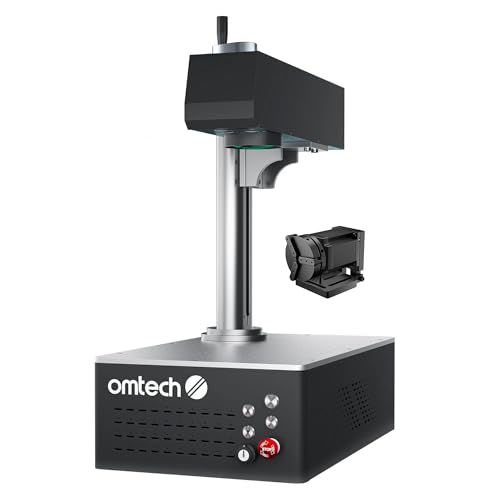
Designed for quick setup and precise results, this 30W unit includes autofocus to automatically adjust focal length for different metals and intricate designs. The 150 x 150 mm bed supports a range of engraving tasks, and the rotary axis expands capabilities to round objects. Best for hobbyists and small business owners seeking fast, repeatable results. Limitation: autofocus performance may vary with highly reflective or irregular shapes; confirm compatibility with your intended materials.
ComMarker US Stock B4 20W Fiber Laser Engraver with Rotary

Best for buyers seeking a versatile 2-in-1 desktop and handheld option with multiple lenses. The B4 setup includes two lenses for different working areas and a rotary drive for round objects. It supports LightBurn and EzCad2, enabling straightforward workflows. Choose this if you want flexibility between desktop and handheld use and a broader set of accessory options. Limitation: 20W power may be less suitable for deeper engraving on harder metals compared to higher-watt options.
OMTech 30W Fiber Laser Marking Machine with Rotary Aix

Best for professionals needing high precision and a robust build. Features include a 0.01 mm spot size, fast marking up to 10000 mm/s, and a red dot focus aid to simplify setup. Rotary support enables round object engraving such as jewelry, tags, and cups. Consider this if you require reliable repeatability and an integrated focus assist, but beware edge performance may be optimized for light to moderate marking rather than deep, high-power operations.
Monport 60W Fiber Laser Engraver & Rotary Axis

Best for users needing higher power and deeper engraving on metals. The 60W class provides stronger marking potential while maintaining a 150 x 150 mm work area and a 100000-hour lifespan. The motion system and F-theta mirror contribute to 0.01 mm accuracy, with a high-speed marking rate up to 10000 mm/s. Choose this if deep engravings on hard metals are a priority, but ensure proper cooling and ventilation for longer runs.
Buying Guide: Key Purchase Considerations
- Power and engraving depth: Higher wattage enables deeper marks on tougher metals. Balance power with desired speed and edge quality.
- Workbed size and focal range: Larger beds support bigger parts; confirm focal distance fits your typical material thickness to avoid weak areas.
- Rotary compatibility: Ensure the machine includes or supports a rotary axis for cylindrical objects; verify compatibility with your object shapes and sizes.
- Software and workflow: Look for LightBurn or EzCad2 compatibility for straightforward design-to-engrave workflows. Confirm whether autofocus or red dot assists are included.
- Accuracy and repeatability: Seek machines with 0.01 mm accuracy and stable power output to ensure consistent results across parts.
- Maintenance and lifetime: Longevity is important for cost of ownership. Consider lifespan claims and required consumables or cooling considerations.
FAQ
- What metals can a fiber laser engraver mark with a rotary?
Most fiber lasers mark metals such as stainless steel, aluminum, copper, brass, gold, silver, and titanium; some also mark certain plastics. Check your model’s material guide. - Is autofocus important on a fiber laser engraver?
Autofocus helps automatically adjust focal length for varying material thickness, improving engraving consistency on mixed materials. - What is the role of a rotary axis?
A rotary axis allows engraving around cylindrical objects, rings, bracelets, and other round items by spinning the workpiece during marking. - Do these machines require software to operate?
Most models support LightBurn or EzCad2. Software compatibility affects design workflow and file formats you can import. - Can larger wattage cause more heat or require cooling?
Yes. Higher-power units may need adequate cooling and ventilation during prolonged marking to avoid thermal drift. - Are all models interchangeable with accessories?
Rotary drives and extra lenses vary; confirm accessory compatibility with your chosen unit before purchasing.
Add a Comment