Choosing the right desktop CNC milling machine involves balancing size, capability, and software compatibility. This guide highlights five top options and outlines what each brings to wood, plastic, metal, and PCB projects. The following selections cover beginner-friendly starters and more capable compact machines, all suited for desktop setups. Use the summary table to compare core strengths at a glance.
| Product | Brand | Best For |
|---|---|---|
| Genmitsu Cubiko CNC Router Machine | Genmitsu | Plug-and-play woodworking, acrylic engraving, light metals |
| Carvera Air Desktop CNC Machine (4th Axis option) | MAKERA CARVERA | Multi-tool workflows, hobbyist carving, 3D projects |
| AnoleX CNC Router Machine 3030-Evo Max | AnoleX | Heavy-duty metal and multi-material cutting |
| WolfPawn 4040 PRO CNC Router | WolfPawn | All-metal build, larger work area, GRBL setups |
| FoxAlien Masuter Pro | FoxAlien | Stable all-metal frame, versatile spindle options |
Genmitsu Cubiko CNC Router Machine

The Genmitsu Cubiko is designed as a ready-to-use desktop CNC router. It targets beginners and hobbyists who want to start engraving wood, acrylic, and even some metals with minimal setup. Its standout features include automatic tool height adjustment and smart surface scanning, which reduce the manual steps needed to get accurate results. The Cubiko supports Genmitsu App, Fusion 360, Easel, Candle, and Carveco, with step-by-step tutorials to ease learning curves. This model emphasizes safety and simplicity while delivering reliable results for small projects like signs, jewelry boxes, and decorative panels.
Key features include automatic tool height adjustment—no manual tool-diameter compensation needed—and surface measurement to compensate for slight material irregularities. This combination helps achieve smoother carving paths and consistent depths across uneven surfaces. The plug-and-play nature makes it an attractive choice for classrooms, makerspaces, and personal workshops seeking an out-of-the-box experience with robust software support.
Carvera Air Desktop CNC Machine with Quick Tool Changer
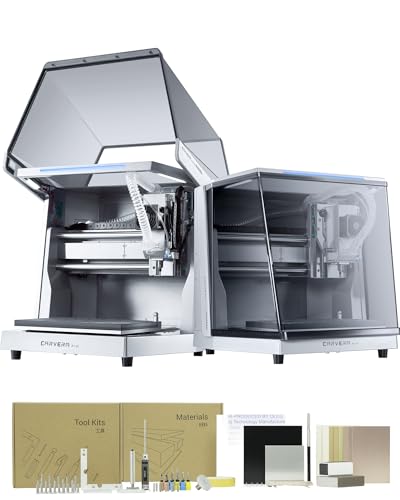
The Carvera Air combines a compact enclosed footprint with a 11.8″ x 7.9″ x 5.1″ work area. It emphasizes practical throughput with a quick tool changer, auto probing, and leveling for faster setup times across multiple tools. The closed-loop control improves stability and precision, while optional 4th axis and laser options expand potential applications. The machine is suited to intricate carving on wood, plastics, and lightweight metals, and it pairs with an all-in-one CAM software to streamline workflows for beginners and experienced users alike.
Its enclosure helps contain dust and noise, making it suitable for home workshops and shared spaces. The combination of a compact size, automatic features, and a user-friendly CAM workflow positions it well for personal prototyping, signmaking, and educational demonstrations that require repeatable results.
Carvera Air Desktop CNC Machine With 4th Axis

This Carvera Air variant extends the 4th-axis capability, enabling cylindrical machining and 3D rotary work. The 4th axis module broadens possibilities for creating threaded components, custom cams, or decorative turned features, while maintaining a compact footprint. Like the original Carvera Air, it features quick tool changes and a strong emphasis on safety within an enclosed workspace, making it a solid choice for makers pursuing more complex multi-axis projects without stepping up to a floor-standing unit.
The machine’s 10-second tool-change speed helps reduce downtime on multi-tool projects, and the included CAM software supports a range of workflows. It remains suitable for wood, plastics, and even some soft metals, aligning with hobbyist and advanced hobbyist needs alike.
AnoleX CNC Router Machine 4030-Evo Ultra 2

The AnoleX 4030-Evo Ultra 2 is a high-capacity desktop option designed to handle metal, aluminum, wood, and plastics with increased rigidity. It features dual steel linear guides, ball screws, and a robust 800W trim router with GRBL 1.3a firmware. The controller supports advanced functions like laser engraving, 4th-axis expansion, and a touch probe, which broadens its utility for precise carving, engraving, and light milling tasks. AnoleX emphasizes upgrade paths, including a potential 1.5kW spindle kit, to boost capacity for demanding projects.
With upgraded linear rails and a stiff all-metal frame, this model addresses vibration and deflection on tougher materials. For users exploring metal work or intricate multi-material projects in a compact space, the Evo Ultra 2 offers a balanced mix of power, precision, and expandability.
WolfPawn 4040 PRO CNC Router

The WolfPawn 4040 PRO offers a sturdy all-metal frame and a substantial 15.75” x 15.75” x 2.95” workspace, making it suitable for mid-size projects. A 500W spindle drives cutting and engraving in wood, acrylic, and certain plastics. The machine uses a GRBL-compatible control setup with pre-assembly for easier installation and supports common software like UGS, Candle, and Fusion 360. Its emphasis on stability and speed helps users produce cleaner edges and finer details in a desktop format.
Designed for hobbyists and makers who want a reliable, relatively large desktop option, the 4040 PRO blends a robust mechanical build with practical software compatibility. It’s well-suited for signs, panels, and small furniture components where precision and repeatability are prioritized over sheer production throughput.
FoxAlien Masuter Pro 3-Axis CNC Router

The FoxAlien Masuter Pro emphasizes an all-metal structure with enhanced stability for precise engraving and cutting on wood, acrylic, and similar materials. It offers a dust-proof controller, emergency stop, and home buttons for safer operation. The Masuter Pro ships with versatile spindle options and clamps that support various spindle sizes, making it adaptable for a range of carving tasks. This model is built to withstand repeated use in a home workshop while delivering consistent results on intricate designs.
Versatility is a key draw, with support for upgrades like different spindle configurations and a robust set of mounting options. The Masuter Pro aims to balance affordability with dependable performance, appealing to makers who want a capable, all-metal desktop machine that can grow with their experimentation and project complexity.
Buying Guide: Key Purchase Considerations And Comparisons
- Work area and footprint: Desktop CNCs come in a range of sizes. Consider your workspace and the maximum material dimensions you plan to machine. Larger work areas enable bigger panels and Signs, but require more bench space and stable mounting.
- Frame rigidity and materials: All-metal builds generally offer better rigidity, reducing vibration and improving precision on higher-speed cuts and harder materials. Look for linear rails, robust Z-axis support, and high-quality lead screws when dealing with metal or dense plastics.
- Spindle power and versatility: Spindle or router power determines what you can cut. Models with 800W to 1.5kW options extend capabilities into metal and thicker materials. Check compatibility with upgradable spindles if you expect growth.
- Software and automation: Evaluate the software ecosystem—CAM programs, firmware, and any auto-probing, auto-surfacing, or tool-height features. Beginner-friendly packages alongside open-source options can expedite learning and project prototyping.
- Tool changing and automation: Quick tool changers reduce downtime on multi-tool projects. Auto probing and leveling features help with accuracy across non-flat surfaces, saving setup time and improving repeatability.
- Safety and enclosure: Enclosures minimize dust and noise, making desktop CNCs more suitable for shared spaces or late-night work. Consider dust collection compatibility and safety interlocks when available.
- Expansion and customization: Some machines offer 4th axes, laser modules, or rotary fixtures. If you anticipate expanding into complex multi-axis tasks, prioritize models with modular upgrade options and clear upgrade paths.
- Community and support: A strong user community and accessible tutorials help with troubleshooting, project ideas, and software tips. Check for official documentation, video guides, and forum activity.
Across these options, users should weigh initial ease-of-use against long-term capability. Starter machines excel for signs, plaques, and basic engravings, while more capable compact CNCs open doors to metal cutting, 3D reliefs, and rotary work. Consider your most frequent project types, the material mix, and how much you value automation versus manual control. The right desktop CNC milling machine blends your immediate needs with scalable features for future projects.
Add a Comment