Answering quick, practical needs for buyers seeking reliable data center racks and related mounts. This guide highlights five widely used options that fit standard 19″ racks and cabinets, clarifying who they’re best for, and why each stands out. Ideal buyers include small offices upgrading to a compact rack system, IT pros equipping multi-device labs, and facilities managers seeking versatile, plug‑and‑play solutions. The comparison below helps you pick shelves, racks, and accessories that balance space, airflow, and mounting flexibility.
| Product | ||
|---|---|---|
| Jingchengmei 2U Cantilever Shelf | 2U per shelf; 19″ rack compatible | Small equipment or patch panels in compact enclosures |
| RIVECO 12U Network Rack | Open frame, 4-post, on wheels | Room-to-room network gear with mobility needs |
| Jingchengmei 6U Desktop Open Frame | 6U; 19″ rack-mount compatible | Desk-mounted or bench-top networking/AV setups |
| StarTech.com 1U Adjustable Shelf | 1U, 4-post adjustable depth | Heavy-use shelf for 19″ devices in mixed racks |
| StarTech.com 2-Post 1U Cable Management & PDU | Cable management & power distribution | Organized wiring and power for compact racks |
Jingchengmei 2U Cantilever Shelf Set
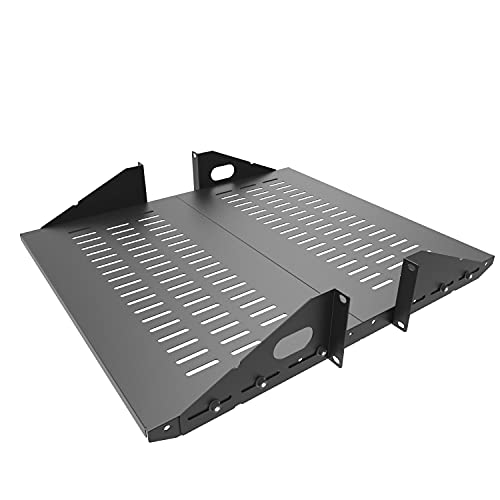
Best for: small IT closets or equipment rooms needing extra shelf mounting without full enclosures. This two-shelf set is designed for 19″ racks and cabinets, with center-weighted mounting to balance loads. Each shelf measures W 19″ x D 10″ x H 2U, and the set fits mounting posts from 75 mm to 125 mm in depth. Use cases include AV gear, switches, or small servers where vented, center-weighted support helps airflow and stability.
Why selected: It provides a simple, compatible way to add storage within existing 19″ frames, making it a practical upgrade for space-limited racks. The vented design encourages airflow and helps prevent heat buildup around mounted devices.
Caution: Verify post spacing and depth compatibility with your specific cabinet to ensure a snug mount. The set is best when you need two shelves rather than a full cabinet enclosure.
RIVECO 12U Network Rack with Wheels

Best for: IT rooms or studios needing a mobile open rack with abundant space. This 12U four-post rack includes a reinforced top cover, wheels for mobility, and a mix of round and square mounting holes. The design accommodates 19″ equipment, plus a convenient PDU and one 1U rack shelf as part of the kit. It blends ventilation with a sturdy frame suitable for AV gear, servers, or network devices.
Why selected: The combination of mobility and flexible mounting makes it well-suited for environments that require frequent reconfiguration or temporary setups. The dual-hole system supports a broader range of devices and mounting hardware.
Limitation: The open-frame design prioritizes airflow, but it offers less security than locked cabinets. Consider placement in secure areas and use cable management to reduce accidental disconnections.
Jingchengmei 6U Desktop Open Frame

Best for: small studios or home offices that need a compact, tabletop rack solution. The 2-post 6U desktop rack is designed for bench-top use, with a footprint suitable for workspaces without a dedicated wiring closet. Dimensions are W 19.8″ x D 11.6″ x H 6U (12.9″ with non-slip feet). It is compatible with 19″ rack-mount equipment such as switches and media devices, and comes with 24 M6 screws and cage nuts for mounting.
Why selected: Its open-frame, free-standing design allows easy access to equipment, quick setup, and flexible placement on a desk or workstation. The included mounting hardware simplifies initial deployment.
Caution: Desktop racks sit on surfaces that may vibrate or shift; ensure stable placement and consider anti-slip feet if used on desks with vibration or foot traffic.
StarTech.com 1U Adjustable Shelf

Best for: racks that need a flexible mounting surface for various devices. This 1U, 19″ shelf has adjustable depth (19.5-38 inches) and a fixed surface depth of 27.56 inches, supporting up to 150 kg (330 lb). It is ideal for housing non-rack-mount equipment or consolidating tools, with durable SPCC steel construction for long-term use.
Why selected: The shelf’s adjustable depth makes it a versatile option within mixed-rack environments, enabling easy accommodation of different devices without swapping racks. The heavy-duty build supports heavier components, reducing sag and tipping risk.
Limitation: For strictly primary 19″ rack-mount enclosures, ensure the shelf’s depth range aligns with your rack’s internal depth and mounting hardware, so it sits securely without overhang.
StarTech.com 1U Cable Management Organizer

Best for: improving cable organization in existing racks without blocking airflow. This 1U D-ring cable management panel provides passthrough holes to guide cables neatly out of the rack, reducing clutter and tangles. It’s compatible with standard 19″ racks and requires minimal installation hardware for quick setup.
Why selected: Clean cabling is essential for airflow, troubleshooting, and future expansions. This organizer reduces cable stress and makes maintenance easier in dense rack environments.
Limitation: It’s a passive component; for heavy cable volumes, you may need additional organizers or more robust cable management solutions to maintain order over time.
StarTech.com 2-Post 1U PDU and Cable Manager
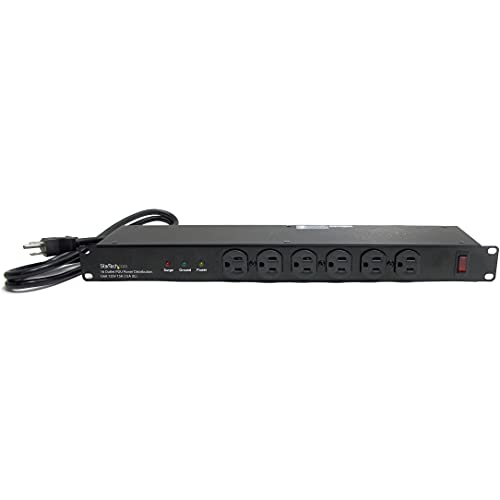
Best for: powering a compact rack setup with front and back access to outlets. This 1U horizontal PDU supplies 16 outlets (front) and 10 outlets (back) with surge protection and a 6 ft cord. It supports 120V, 15A service and helps centralize power distribution in 19″ racks.
Why selected: A balanced power distribution approach keeps devices reachable and reduces cable spaghetti in small to mid-size rack deployments. The compact footprint fits within 1U space while delivering ample outlets for a range of equipment.
Limitation: For higher-power devices or denser racks, verify total amperage usage and consider additional PDUs or dedicated power planning to avoid overloading the circuit.
Buying Guide
- Rack type and mounting style: Choose between open frames, cantilever shelves, desktop racks, or enclosed cabinets based on space, security needs, and airflow requirements. Open frames offer airflow but less security; enclosed cabinets provide physical protection and dust containment.
- Depth, width, and height compatibility: Confirm that devices fit within the rack’s depth (inches or millimeters), width (standard 19″), and height (U units). Mismatches can cause mounting difficulties or airflow obstructions.
- Weight capacity and load distribution: Ensure shelves and racks support your heaviest devices without sagging. Consider center-weighted shelves for balanced loads in cantilever designs.
- Ventilation and thermal considerations: Favor vented shelves, open frames, or racks with breathable top/bottom plates to improve cooling in dense deployments.
- Cable management and power planning: Use dedicated cable organizers and PDUs to reduce clutter, improve airflow, and simplify maintenance. Plan for future expansion with adjustable shelves or extra PDU outlets.
- Mobility and placement: Mobile racks with wheels are useful in dynamic environments but require secure placement or locking casters to prevent movement during use.
- Security and accessibility: Weigh the need for lockable enclosures against the convenience of open access, especially in shared or publicly accessible spaces.
Frequently Asked Questions
What is a 19-inch rack? A 19-inch rack is a standard mounting framework with a 19-inch wide front panel, used for mounting equipment in data centers, labs, and offices.
Why choose an open frame vs. enclosed cabinet? Open frames maximize airflow and cooling; enclosed cabinets offer security, dust protection, and organized cabling. The choice depends on security needs and heat management.
What does U (rack unit) mean? One rack unit (U) equals 1.75 inches of height. Shelves and devices are measured in U to ensure proper fit inside racks.
How important is cable management in racks? Cable management improves airflow, reduces heat buildup, and simplifies troubleshooting. It also makes future upgrades easier.
Can a rack shelf support hot-swappable devices? Shelf load capacity must be checked; many shelves support standard server gear, but verify weight limits and mounting compatibility for your devices.
Add a Comment