When you need precise, clean cuts on metal, a high-powered laser cutter or engraver is essential. This guide highlights five capable machines suited for metalwork, from industrial-grade 1200W systems to compact hobbyist models. The top picks cover fast cutting, burr-free edges, and safe operation for hobbyists, makers, and small shops. Read on to find which model matches your material, budget, and project scale.
Buyer focus summary (quick view):
- xTool MetalFab 1200W: Best for fast, professional-grade metal cutting and welding in a single 4-in-1 system.
xTool MetalFab 1200W 4-in-1 Laser System
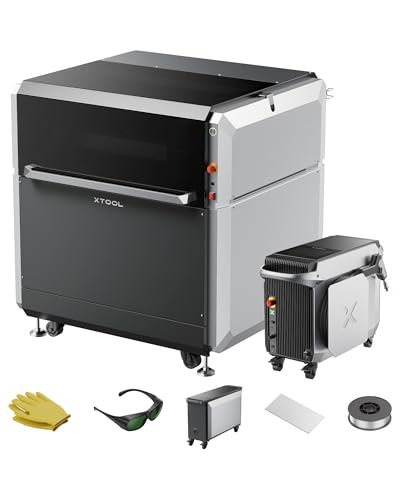
The xTool MetalFab integrates a 1200W fiber laser welder, a CNC laser cutter, a laser cleaner, and an engraver into one platform. Best for: fast prototyping and production where a single machine handles cutting, cleaning, engraving, and welding. It’s designed to cut up to 10 mm carbon steel and 5 mm stainless steel with burr-free edges and minimal distortion. The bed size is 610mm x 610mm, with dual cameras for accurate positioning and a broad preset library of 108+ options to speed setup. Limitation: the system’s complexity and size require adequate space and a learning curve for beginners. Best for: makers and small shops needing integrated metal fabrication in one workflow.
Twotrees TTS-55 Pro Laser Engraver

Best for: hobbyists and small makers who need a capable 5500 mW laser with a 300 x 300 mm work area. It offers fine engraving detail (0.06 x 0.46 mm spot focus) and supports a range of materials, including wood, leather, acrylic, and some metals. It includes an air-assisted nozzle to improve cutting depth and cleanliness. Limitation: metal cutting is more limited than higher-powered systems; best for engraving and light cutting on metal or coated metal. Choose this if you want a compact, affordable entry into metal engraving with room to grow.
Carverall K15 Pro 10W Laser Engraver

Best for: compact, home and craft projects involving coated metals, wood, and acrylics with a true 10W laser. It features an offline engraving mode, a near A4 work area, and detachable heightening columns for taller objects. The device supports wireless and wired control and is compatible with design tools like LightBurn. Limitation: while powerful for its size, larger metal parts may require a bigger cutting area or higher-watt systems. Use this if you want a space-saving tool that still delivers consistent results on metal and other materials.
ACMER S2 Laser Engraver

Best for: users needing high-precision engraving on metal and other materials with a high-detail 0.01 mm engraving accuracy and a 300 x 300 mm workspace. The S2 uses a true 12W laser head and supports multi-material engraving, offering depth with multi-pass cuts. It can engrave on over 100 materials and achieves fast speeds up to 10,000 mm/min. Limitation: high power can require additional safety measures and proper ventilation. Choose this for intricate metal engraving and large-format projects where detail matters.
CREALITY FALCON 10W Laser Engraver

The CREALITY FALCON 10W engraver includes a rotary roller for cylindrical objects and a 72W system with high precision. Best for: users who need 10W capability with rotary engraving for cups, tumblers, and round items, along with wood and acrylic work. It cuts and engraves at high speeds, and the rotary accessory increases versatility for cylindrical shapes. Limitation: the 10W power is more suited to hobbyist projects rather than heavy industrial metal cutting. Choose this for rotating object engraving and multi-material tasks in one compact unit.
Buying Guide
Key considerations help you pick the right metal laser cutter or engraver for your needs:
- Power vs. material: Higher wattage enables cutting thicker metal. For steel, look at 1,000+ watts; for engraving and light cutting, 5–12W diode and fiber systems can suffice.
- Bed size and work area: Larger beds enable bigger parts; smaller desks fit tighter spaces but may limit projects.
- Cooling and ventilation: Industrial metal cutting can produce heat and fumes. Verify required ventilation and any cooling features in the unit.
- Software compatibility: Ensure compatibility with design tools like LightBurn or native software; cross-compatibility reduces setup time.
- Safety features: Look for emergency stop, protective shields, laser class, and eyewear recommendations to protect operators.
- Ease of use vs. professional capability: Beginners benefit from presets and guided workflows; professionals may prioritize raw cutting capacity and precision.
- Upgrade path: Consider modular systems or add-ons (rotary rollers, air assists) to extend capability as your projects evolve.
FAQs
- What is the best laser for professional metal cutting at home?
– A system like the xTool MetalFab or higher-watt fiber laser units is best for professional metal cutting due to power and integrated features. - Can hobby laser engravers cut metal?
– Most hobby devices focus on wood, acrylic, and coated metals. Some can engrave thin metals with multipass methods, but cutting thick metal is limited. - Is a rotary accessory essential for metal projects?
– Rotary rollers are especially useful for cylindrical metal objects and consistent engraving around curves. They are not always required but add versatility. - What safety features should I look for?
– Emergency stop, shielded housing, proper ventilation, and clear safety instructions are essential for metalworking lasers. - Do I need software like LightBurn?
– Compatibility with LightBurn or similar software is highly helpful for flexible design workflows and easier file preparation. - Will these machines require additional accessories?
– Depending on the model, you might need air assist, additional lenses, rotary modules, or ventilation accessories to maximize performance.
Add a Comment