Direct answer: For offices requiring high-volume, nonstop shredding with strong security, these five models deliver robust performance, long run times, and easy maintenance. They suit mid to large-size workgroups, finance teams, and facilities departments that process confidential documents daily. Below is a quick comparison to help you choose.
Overview of selected products:
| Product | Shredder Type / Auto Feed | Sheet Capacity | Run Time | Security Level |
|---|---|---|---|---|
| BONSEN 300-Sheet Auto Feed | Auto Feed / Manual | 300 | Auto 60 min; Manual 30 min | P-4 |
| Aurora Commercial Grade 200-Sheet Auto Feed | Auto Feed / Manual | 200 | Nonstop 60 min | P-5 |
| Trishintage 400-Sheet Auto Feed | Auto Feed / Manual | 400 | 30 min manual; 30 min auto intermittent (implied by dual systems) | P-5 |
| Bonsaii 200-Sheet Auto Feed | Auto Feed / Manual | 200 | Auto 60 min; Manual 30 min | P-4 |
| Amazon Basics 200-Sheet Auto Feed | Auto Feed / Manual | 200 | Auto 60 min; Manual 10 min | P-4 |
BONSEN 300-Sheet Auto Feed Paper Shredder

Best for: Busy corporate desks and admin teams handling large volumes of mixed documents. The 300-sheet auto feed reduces manual labor, while a 60-minute auto run time supports long shredding sessions. The 8.1-gallon bin minimizes interruptions. Caution: Ensure jam-prevention features are used during high-volume manual feed tasks.
Aurora Commercial Grade 200-Sheet Auto Feed
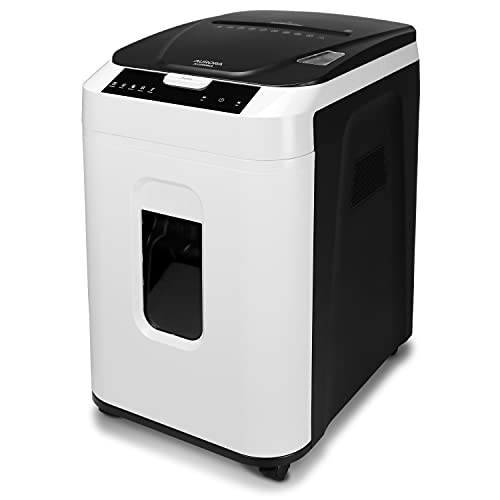
Best for: Security-conscious offices needing higher protection, as this model offers P-5 micro-cut shredding with nonstop 60-minute operation. Ideal for finance or HR teams processing sensitive records. Limitation: Higher security micro-cut produces more shredded pieces, which increases waste bin usage over time.
Trishintage 400-Sheet Auto Feed Shredder

Best for: Larger home offices or small businesses with high-volume shredding needs. The 400-sheet auto feed supports long sessions, with dual cooling and a large 50-liter bin for less frequent emptying. Caution: Manual slot supports fewer sheets per pass, so plan mixed-task workflows accordingly.
Bonsaii 200-Sheet Auto Feed Shredder

Best for: Open-plan offices needing quiet operation and energy efficiency. The device offers a long 60-minute run time and an energy-saving mode after inactivity. Choose this if you want balanced performance with manageable noise levels. Limitation: The 8.1-gallon bin requires periodic emptying during high-volume tasks.
Amazon Basics 200-Sheet Auto Feed Shredder

Best for: Budget-conscious offices needing solid cross-cut security with reliable auto feed. The P-4 cross-cut provides adequate data protection, and the 8.5-gallon bin reduces interruption. Caution: Auto feed efficiency varies with document mix; heavy staples or clip-heavy stacks may require manual intervention.
Buying Guide
What to consider when choosing a commercial heavy-duty shredder:
- Shredder type and feed: Do you need auto feed for bulk processing or manual feed for selective shredding?
- Sheet capacity and run time: How many sheets per pass and how long can the shredder operate without cooling?
- Security level: What level of destruction is required (P-4 vs P-5 micro-cut or cross-cut) for your documents?
- Bin size and mobility: Is a larger pull-out bin important, and do you need wheels or casters for easy relocation?
- Noise and energy use: Is quiet operation and power efficiency a priority in your workspace?
- Maintenance needs: Consider anti-j jam features, auto-reverse, and cooling systems to minimize downtime.
How to choose between auto feed and manual modes?
Auto feed is best for high-volume, routine shredding when you want hands-free operation. Manual mode offers control for irregular documents or small jobs where auto-reading could jam. Look for models with dual cooling and jam-prevention features to maximize uptime.
Which security level fits your data?
P-4 shredders are adequate for most administrative records. P-5 provides higher security by producing smaller particles, suitable for highly sensitive information such as financial records or compliance documents.
Maintenance tips for commercial shredders
- Empty bins before they’re full to prevent backflow and jams.
- Use auto-reverse and anti-jam features to clear paper jams safely.
- Schedule regular cooling periods after prolonged operation to avoid overheating.
FAQ
- What is the typical run time for commercial shredders? Most provide between 30 and 60 minutes of continuous operation, with cooling intervals recommended by the manufacturer.
- What security level should I choose? For ordinary business documents, P-4 is common; P-5 is reserved for highly sensitive data.
- Is auto feed worth it for a small office? Yes, if you process large volumes daily; otherwise manual feed can suffice for occasional shredding.
- Do shredders shred credit cards? Many models with manual slots can shred cards; verify this in the product features.
- How often should I replace the bin? Generally when the bin is full or the shredder signals a full bin to avoid overflow.
- Can I move a heavy shredder around the office? Models with casters and a practical bin size are easier to relocate between desks or rooms.
Add a Comment