Answer: If you’re shopping for a CNC mill tool changer, prioritize compact desktop CNC machines with a quick tool changer, closed-loop control, and Makera CAM compatibility for easy workflow. This guide highlights five practical choices for hobbyists and small shops, focusing on tool-changing speed, accuracy, and expandability. The top picks include Carvera Air desktop CNC machines with quick tool changers (and optional 4th axis), plus a versatile face endmill adapter and an add-on automatic tool changer. The buyer types best served by each model are noted to help you choose confidently.
Summary of selected products:
- Carvera Air Desktop CNC Machine with Makera CAM (3‑Axis, Quick Tool Changer)
- Carvera Air Desktop CNC Machine with 4th Axis (Extended capabilities)
- Carvera Air Desktop CNC Machine with 4th Axis and PCB Kit (All-in-one kit)
- Face Endmill Adapter MT2/MT3/MT4 (Versatile tool holder adapter)
- Automatic Tool Changer for CNC Machine (4-Line Z-Axis system)
Carvera Air With Makera CAM And Quick Tool Changer

The Carvera Air with Makera CAM is a compact desktop CNC mill designed for makers, hobbyists, and small workshops. It combines milling, carving, and engraving with an intuitive CAM workflow. Best for beginners and intermediate DIYers who need a ready-to-run system in a small footprint. The integrated quick tool changer lets users swap milling bits in about 10 seconds, speeding multi-tool projects. A closed-enclosure helps reduce noise and contain chips, improving safety for home workshops. Caution: enclosure size may limit larger workpieces; plan workholding accordingly.
Who it’s best for
- Newcomers seeking an all-in-one desktop solution
- Small workshop users needing fast tool changes for prototypes
Carvera Air With 4th Axis And Quick Tool Changer

This Carvera Air variant adds a 4th axis option, opening cylindrical machining, true 4th-axis simultaneous operations, and expanded rotary capabilities. It’s suited for users who want more complex geometries, like round components or 3D shapes, without moving to a larger system. The 4th axis works alongside the quick tool changer for efficient tool cycling during multi-step processes. Caution: 4th-axis performance depends on workholding and calibration; ensure compatible fixtures for your parts.
Who it’s best for
- Machinists seeking expanded capabilities for cylindrical parts
- Enthusiasts pursuing more advanced 3D/rotary projects
Carvera Air With 4th Axis And PCB Kit

This model pairs a 4th axis with a PCB-focused kit, appealing to electronics hobbyists and makers who combine PCB prototyping with mechanical parts. The 4th axis broadens capabilities for true 3D forms and cylindrical work. The quick tool changer reduces downtime between milling, drilling, and engraving steps. Caution: PCB milling may require specific feed rates and bit types; verify bit compatibility with your board materials before starting work.
Who it’s best for
- Electronics hobbyists seeking integrated milling for PCBs and enclosures
- Small workshops needing a versatile all-in-one desktop solution
Face Endmill Adapter MT2/MT3/MT4

The Face Endmill Adapter MT2 MT3 MT4 is designed for seamless compatibility with a range of CNC tool holders, including FMB22 and R8 sizes. It enables quick installation and faster setup, improving machining efficiency and versatility. Best for users who frequently swap endmills or need quick-tool-change workflows without retooling fixtures. Caution: Ensure adapter size matches your spindle and tool holder to avoid runout or alignment issues.
Who it’s best for
- Shop technicians needing fast, flexible tool-holding options
- Users upgrading tool-change versatility without changing existing spindles
Automatic Tool Changer For CNC Machines
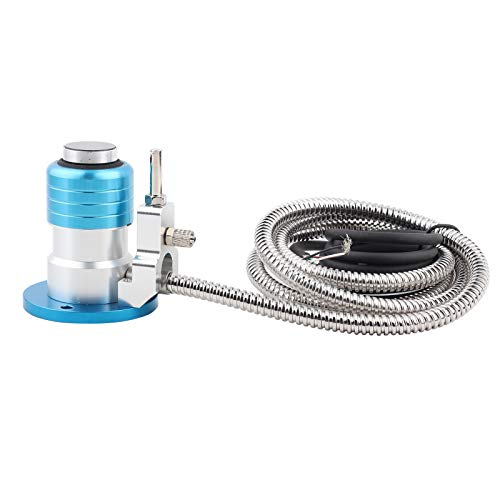
The Automatic Tool Changer is a 4-line Z-axis system designed for router engraving, milling, and precision engineering. It enables automated tool changes within a machine, reducing manual intervention and increasing throughput on multi-tool projects. Best for shops that perform high-mix, low-volume runs or complex parts requiring several tools in one program. Caution: System compatibility depends on your existing CNC controller and firmware; verify support before purchase.
Who it’s best for
- Facilities requiring automated tool changes to speed production
- Users handling multi-tool sequences in single setups
Buying Guide: Key Considerations For CNC Mill Tool Changers
- Quick tool changer speed and reliability: Look for 10-second tool swaps and a robust tool-holding design to minimize downtime.
- Axis options and expansion: Decide between 3-axis, 4th-axis, or add-ons based on the complexity of parts you plan to Machine.
- Enclosure and safety: Enclosures reduce noise and contain debris, important for home workshops and shared spaces.
- Software compatibility: Ensure CAM software supports your workflow and integrates smoothly with tool-changer hardware.
- Workholding and fixtures: Verify the machine’s bed size and fixturing options match your typical parts.
- Control system and precision: Closed-loop control provides feedback for improved accuracy in hobby and light professional use.
- Upgrade paths: Consider whether you may need a PCB kit, rotary axis, or additional adapters in the future.
Tool-changer versus upgrade paths
Tool-changers speed up job completion and reduce manual changes, while add-ons like 4th axes or adapters extend capabilities. Choose a baseline machine with a clear upgrade path if you anticipate scaling up to more complex parts or multi-step processes.
Material and process considerations
Different machines handle wood, plastic, aluminum, and some metals with varying ease. Look at spindle speed ranges, rigidity, and feed rates to ensure your typical projects are supported without excessive tool wear.
FAQ: Common Questions About CNC Mill Tool Changers
- What is a quick tool changer? A mechanism that swaps endmills and tools in seconds to speed multi-step milling tasks.
- Do I need a 4th axis? A 4th axis enables rotary and cylindrical machining, expanding capabilities for complex parts.
- Is a closed enclosure necessary? It helps reduce noise, contain debris, and improve safety in home or small-shop environments.
- Will adapters fit my spindle? Check spindle diameter and tool-holder compatibility with MT2/MT3/MT4 adapters for best results.
- Can I use PCB milling with these machines? Some models include PCB-oriented kits; verify bit types and CAM settings for electronics projects.
- What should I consider when upgrading? Consider upgrade paths like 4th-axis kits, PCB kits, and automated tool changers to fit your growth plan.
Add a Comment