Looking for a reliable CNC laser cutting machine or versatile CNC router from a reputable manufacturer? This guide highlights five top options, each with clear strengths for different buyers. Whether you’re a hobbyist, small business owner, or workshop professional, these picks help you balance precision, safety, and capability. Best for detailed engraving, heavy cutting, or flexible modular upgrades, these machines are chosen for reliability, supported ecosystems, and practical use cases for wood, acrylic, metal, and more.
Buyer summary table
| Product | Best For | Why It Stands Out | Limitations |
|---|---|---|---|
| FoxAlien Masuter Pro | Beginner to intermediate hobbyists | All-metal build with robust Z-axis; multiple spindle options | Requires compatible spindles for full power |
| BlazeX M3 | Desktop laser engraving and cutting | Ultra-precision 10W laser; enclosure kit; beginner-friendly | Limited to laser materials and thickness by power |
| LONGER Ray5 10000mW | Flexible laser projects with large bed | High power, 400x400mm area, touchscreen, multiple connections | Should consider enclosure and safety specifics for heavy use |
| Lunyee 3018 Pro Ultra | Metal and high-precision engraving | All-metal build, upgraded linear guide, larger Z-axis | More complex setup for metal engraving |
| TTC3018 Pro | Compact desktop engraving | All-metal Z-axis, 0.1mm accuracy, wireless and offline options | Smaller working area |
FoxAlien Masuter Pro 3-Axis CNC Router

The FoxAlien Masuter Pro is designed for beginners and hobbyists who want an all-metal, high-stability CNC router with flexible spindle options. The machine features an all-aluminum framework and a reinforced Z-axis with linear rails, delivering improved accuracy for engraving and carving on wood, acrylic, MDF, and nylon. It supports two spindle clamps (52mm and 65mm) and offers upgrade paths to higher-powered spindles, including 60W, 300W, or 1.5KW options. This makes it suitable for projects that start simple but may scale to heavier materials or deeper cuts.
Best for: Beginner to intermediate users who value rigidity and upgrade potential. It’s well-suited for small workshop signmaking, hobby projects, and prototyping with a safe, dust-resistant controller design.
Why selected: The all-metal construction and modular spindle compatibility provide a strong base for precise work and future expansion without needing a full machine replacement.
Caution: Some upgrades require separate accessories and careful alignment; ensure you have compatible spindles and mounting hardware before upgrading.
BlazeX M3 10W Laser Engraver

The BlazeX M3 is a compact 10W laser engraver designed for desktop DIY, small-batch production, and beginners. It blends high-precision engraving capabilities with a user-friendly enclosure setup. It supports engraving on wood, leather, glass, and coated metals, and is optimized for intricate patterns with 0.01mm accuracy. The package includes a starter kit with a honeycomb bed and protection features to help beginners achieve clean results from the first use.
Best for: Beginners seeking a safe, portable laser system for personalized projects, jewelry, and small artwork runs. It’s ideal when you want a ready-to-use kit rather than assembling components from scratch.
Why selected: The combination of 0.01mm precision and a complete starter bundle reduces setup friction for new users and accelerates getting projects into production.
Caution: For thicker or denser materials, verify material suitability and power budget; ensure proper ventilation and safety practices when operating power lasers.
LONGER Ray5 10000mW Laser Engraver
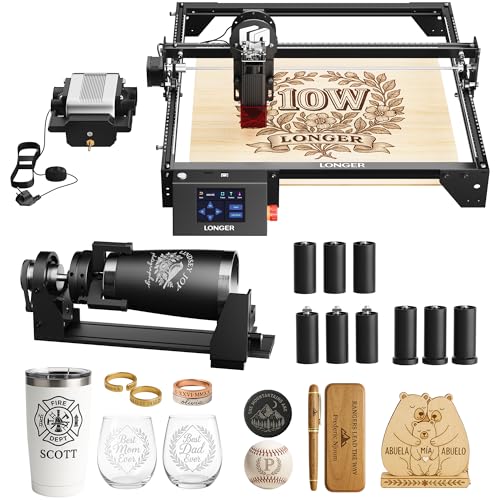
The Longer Ray5 offers a powerful 10,000 mW laser with a large 400×400 mm working area, aiming at more ambitious laser projects. It features a modern ESP32-based processor, dual-beam technology, and a built-in 3.5-inch touchscreen for progress monitoring and control. It supports multiple connection methods including USB, Wi-Fi, TF card, and app control, enabling offline operation and software compatibility with LaserGRBL and LightBurn. The kit includes an air pump, rotary attachment, and 12 risers for versatile material handling and engraving on cylindrical items.
Best for: Creators handling larger parts and intricate designs, including cylindrical items, plaques, and sign components with a focus on efficiency and flexible connectivity.
Why selected: The high power, large bed, and comprehensive accessory package expand capabilities beyond a basic DIY laser setup.
Caution: Higher power lasers require stricter safety controls; ensure a proper enclosure and ventilation when cutting or engraving.
Lunyee 3018 Pro Ultra CNC Machine

The Lunyee 3018 Pro Ultra is an upgraded 3-axis CNC router built with higher rigidity and precision for metal, wood, acrylic, and PCB work. It includes a 500W spindle and an upgraded X-axis with HGH15 linear guides, designed to improve engraving stability and allow more demanding metal work. The platform uses a scale aluminum plate and integrated T-track clamps for securing workpieces, along with an expanded Z-axis height of 80 mm. This setup targets users seeking stronger metal engraving capability and greater material versatility.
Best for: Users who require metal engraving capabilities and higher structural rigidity, plus convenient workholding features for small- to mid-sized projects.
Why selected: The upgraded linear guides and bigger Z-axis height address common rigidity issues in budget desktop CNCs, enabling more reliable precision for metal and hard materials.
Caution: Requires careful setup and ongoing maintenance of linear guides and spindle alignment for optimal results in metal work.
TTC3018 Pro CNC Router

The TTC3018 Pro is a desktop CNC router with an all-metal Z-axis and 0.1mm high-precision capability. It adds 2.4G Wi-Fi, offline engraving via TF card, and USB connectivity, broadening workflow options for classroom, maker space, or home workshop environments. The compact footprint makes it suitable for small-scale engraving and signmaking while preserving accuracy and stability in a budget-friendly package.
Best for: Educational settings, small studios, and hobbyists who want reliable desktop performance with flexible connectivity options for offline and online workflows.
Why selected: The combination of precise Z-axis performance and versatile connectivity supports a variety of projects without heavy equipment or costly upgrades.
Caution: Smaller working area limits the size of pieces; plan projects accordingly and consider table space for larger templates.
Buying Guide: How To Choose A CNC Laser Cutting Machine Or Router
What matters most depends on your use-case. Here are practical considerations to help you pick the right machine.
- Project materials and thickness: Higher power lasers (like 10W or more) enable cutting and engraving on thicker materials, while smaller machines excel at detailed engraving on wood, leather, or acrylic.
- Bed size and work area: A larger bed (for example, 400×400 mm) supports bigger panels and longer runs; smaller desks suit tabletop setups and niche projects.
- Rigidity and stability: All-metal frames and reinforced Z-axes reduce vibration, improving precision for fine engravings on metal or dense woods.
- Upgrade paths and compatibility: Look for machines with modular spindle options or upgrade kits to extend capabilities without replacing the base unit.
- Software and ecosystem: Open-source tools and compatibility with common software (like LightBurn or LaserGRBL) help streamline workflows and future-proof investments.
- Safety and enclosure: Enclosures and protective features matter for laser systems, especially in shared spaces or classrooms.
- Connectivity and offline operation: USB, TF card, or wireless options allow flexible workflows, including offline engraving and field use.
- Maintenance and support: A reputable manufacturer with accessible spare parts and documentation reduces downtime and extends machine life.
Frequently Asked Questions
- What is the difference between a CNC router and a laser engraver?
A CNC router uses spinning bits to remove material, while a laser engraver uses a focused laser beam to cut or engrave materials, often with higher precision on thin materials. - Can these machines engrave metal?
Some machines offer metal engraving capabilities, especially with higher-powered lasers or specialized modules; always verify material compatibility and safety requirements. - Do I need an enclosure for laser machines?
Enclosures improve safety by containing fumes and protecting eyes, particularly in hobbyist and classroom settings. - What software should I use?
Many units support LightBurn, LaserGRBL, or Makerverse-based ecosystems. Open-source options often provide flexibility for custom workflows. - Is a higher wattage laser always better?
Not always. Higher wattage enables thicker cuts but requires stronger safety controls and ventilation. Choose based on intended materials and projects. - Are these machines suitable for beginners?
Several options include beginner-friendly kits and enclosures, but some models expect more setup knowledge or upgrades; start with a kit that includes safety features and clear assembly instructions.
Add a Comment