Looking for a reliable CNC engraving machine that can handle metal while staying within a desktop footprint? This guide highlights five all‑metal desktop CNC routers that stand out for metal engraving and light milling. Each option targets different buyers—from beginners seeking straightforward setups to pros needing robust rigidity for aluminum and brass work. Read on to compare capabilities, suitable materials, and practical tradeoffs.
| Product | Best For | Working Area | Key Strength |
|---|---|---|---|
| Genmitsu 3030-PROVer Ultra | Intermediate to advanced hobbyists | Yes, all solid | High precision, durable all‑metal build |
| FoxAlien Masuter Pro | Beginner to intermediate | All‑metal frame, versatile spindles | Flexible upgrades, solid stability |
| LUNYEE 3020 Nova | Materials variety lovers | All‑metal with precision guides | Strong spindle, precise ball screws |
| Twotrees TTC3018 Pro | Home makers, classrooms | Compact and portable | All‑metal Z‑axis, Wi‑Fi transfer |
| WolfPawn 4040 Pro | Small‑to‑mid scale projects | All‑metal, robust frame | Solid spindle options, GRBL control |
Genmitsu 3030-PROVer Ultra CNC Router
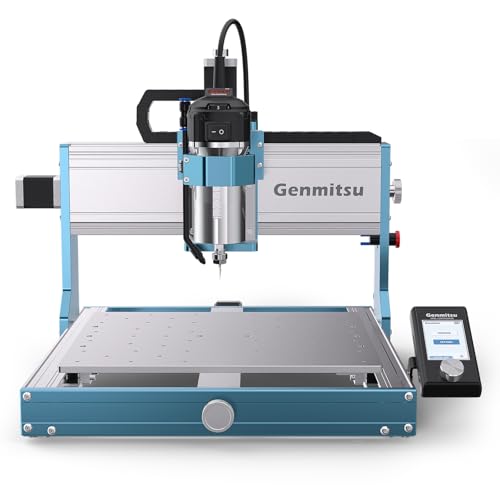
The Genmitsu 3030-PROVer Ultra uses a durable all‑metal chassis with dual linear rails and ball screws. Its 710W digital spindle provides strong cutting power for aluminum and acrylic, while maintaining smooth finishes. This model emphasizes precision and steady operation across demanding engraving tasks. Best for users who want high precision and consistent results with metal materials and reliable dust protection on X/Y axes.
Who it’s best for: intermediate to advanced hobbyists and small shops needing professional precision. Why selected: the all‑metal construction and robust spindle support stable, repeatable metal engraving, with dependable linear rails and ball screws. Caution: the setup and calibration can be more involved for first‑time users.
FoxAlien Masuter Pro 3‑Axis CNC Router

The FoxAlien Masuter Pro features an all‑metal structure with a robust Z‑axis and a 52/65 mm spindle clamp system, offering compatibility with different spindle options. It supports precise engraving on wood, acrylic, MDF, nylon, and other materials, with a dust‑proof controller and emergency stop for safer operation. Best for: beginners who want a sturdy, upgradeable tool for metal and non‑metal projects. Caution: spindle options may require additional upgrades for heavier metal work.
LUNYEE 3020 Nova CNC Router

The 3020 Nova brings an industrial‑grade drive system with 1204 ball screws and HG‑15 linear guides to minimize backlash. Its 800W all‑metal frame supports reliable engraving and cutting across metals, wood, acrylic, and plastics. Best for: users who want strong gearing and precise control for mixed‑material projects. Caution: larger projects require ample workspace and proper dust management.
Twotrees TTC3018 Pro CNC Router

This 3‑axis, all‑metal Z‑axis machine emphasizes compactness with a 300x180x40 mm working area. It includes 2.4G Wi‑Fi and supports USB/TF card offline engraving for flexible workflow. Best for: space‑constrained desks and classrooms needing lightweight metal engraving capabilities. Caution: smaller bed size limits larger metal pieces and batch production.
WolfPawn 4040 Pro CNC Router

The WolfPawn 4040 Pro provides a sturdy all‑metal frame and a 500W spindle option, designed for durable engraving across metal, wood, and acrylic. It uses a GRBL control setup with V‑wheel plus linear rails in X/Y and a TR8 screw on Z. Best for: small workshops requiring a reliable metal‑ capable router with straightforward software compatibility. Caution: configuration may require careful attention to hardware alignment for best results.
Buying Guide: Key Points To Consider
What is your primary material? If you plan to engrave metal frequently, prioritize all‑metal frames, rigid Y/Z rails, and a powerful spindle (700–1000W range for metals). For wood or acrylic mixed projects, a strong all‑metal chassis with good spindle options remains important but may allow lighter entries.
Is workspace size a constraint? Desktop or benchtop machines are ideal for small shops, classrooms, and home studios. Choose a model with a compact footprint but consider the working area if you anticipate larger panels.
What software and control style do you prefer? Open‑source GRBL platforms offer broad software compatibility (ArtCam, Fusion 360, Easel, Carveco Maker). Ensure the machine ships with usable documentation and a support community to ease setup and troubleshooting.
How important is upgradeability? Several models support additional spindles, 4th axes, or laser modules. If you expect growth, pick a system with flexible upgrade paths and readily available parts.
What maintenance and safety features matter? Look for emergency stops, dust protection, limit switches, and easy access to tool changers. These reduce risk and improve repeatability during metal engraving tasks.
Frequently Asked Questions
- What material can desktop CNCs engrave in metal? Materials like aluminum and brass can be engraved with sufficient spindle power, rigid rails, and precise Z‑axis control.
- Do I need professional calibration for these machines? Yes, initial setup and calibration are important for achieving accurate results, especially on metal work.
- Can I upgrade spindles later? Many models offer spindle upgrades or alternative clamps to accommodate higher power units.
- Which machine is best for beginners? Machines with straightforward setup, good safety features, and upgrade paths tend to be friendlier for newcomers.
- Is offline engraving possible with these devices? Several models support offline operation via TF cards or USB, reducing dependence on a PC during production.
- What software should I use for metal engraving? Popular choices include Fusion 360, Easel (for beginners), and compatible CAM software that outputs G‑code for your controller.
Add a Comment