If you’re shopping for a CO2 laser cutter, you want clear performance signals: power, bed size, accuracy, and how easy the system is to operate day-to-day. This guide highlights five well-rounded options that balance power and practicality for hobbyists, crafters, and small shops. Each product section explains who it’s best for, along with clear pros and a potential limitation.
| Product | Power | Best for | |
|---|---|---|---|
| xTool P2S 55W CO2 Laser Cutter | 26″ x 14″ | 55W | Creative professionals needing fast, precise engraving with 3D curve capability |
| OMTech 60W CO2 Laser Engraver | 20″ x 28″ | 60W | Small to medium projects with autofocus and pass-through for longer items |
| SHENGJINSH 80W CO2 Laser | 20″ x 28″ | 80W | Higher throughput for larger or multiple-piece jobs |
| CREALITY FALCON 10W Laser Engraver | — | 10W (class 4) | Starter kit for tumblers, cylindrical objects, and entry-level projects |
| OMTech 45W CO2 Laser Engraver | 12″ x 8″ | 45W | Home use with compact footprint and versatile material support |
xTool P2S 55W CO2 Laser Cutter

The xTool P2S 55W offers strong airflow and an enhanced exhaust system with dual smart 16MP cameras. It supports high-accuracy autofocus using LiDAR and provides real-time previews, which helps you verify designs before cutting. Best for designers and makers who need reliable, high-precision results on wood, acrylic, glass, fabric, and leather, including curved cylinder engraving.
Who this is for: small studios and advanced hobbyists who value high-speed engraving, 3D curve capabilities, and precise autofocus. Why selected: robust airflow, dual cameras, and long-bed capability for larger projects. Caution: setup and software integration may require a learning curve for beginners.
OMTech 60W CO2 Laser Engraver

This 60W CO2 laser comes with a water chiller and LightBurn software, plus autofocus and four-way pass-through doors. The 20″ x 28″ work area suits mid-sized projects, and adjustable workbeds simplify focusing on varying thicknesses. Best for: shops needing steady performance and the ability to handle larger items without rotating pieces. Caution: heavier unit weight may require a dedicated workspace and improved ventilation.
SHENGJINSH 80W CO2 Laser Engraver
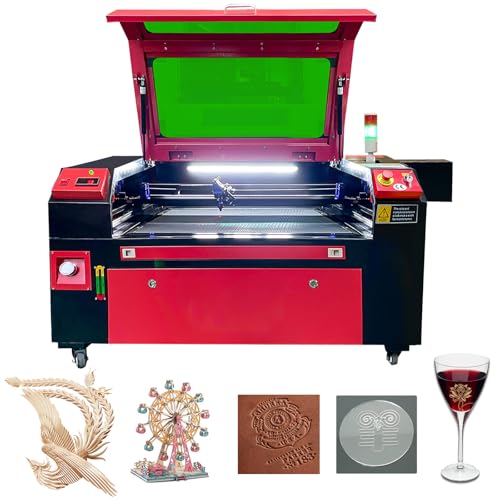
The 80W SHENGJINSH laser offers a large 20″ x 28″ work area with a built-in 6L water tank and a two-way pass-through design. It supports rapid throughput and multi-material engraving on wood, glass, acrylic, and leather. Best for: production-oriented crafters and makers who need faster cutting on tougher materials. Caution: Class 4 laser systems require strict safety practices and proper ventilation.
CREALITY FALCON 10W Laser Engraver

The CREALITY FALCON offers 10W class-4 power focused on small to mid-sized cylindrical and flat projects. It includes a rotary roller for tumblers and curved objects, and safety features such as an emergency stop and anti-UV eye protection. Best for: beginners and makers exploring tumbler engraving and small gift items. Caution: speed and depth vary with material; multi-pass strategies may be needed for thicker items.
OMTech 45W CO2 Laser Engraver

The 45W OMTech provides a compact footprint with a 12″ x 8″ work area, offering a versatile balance of power and size for home studios. Autofocus and air assist help improve cutting performance on wood, acrylic, and glass. Best for: home users who want a dependable, space-saving machine. Caution: smaller bed limits larger items; plan projects accordingly.
Buying Guide: Key Considerations For Your CO2 Laser Cutter
- Power and speed: Higher wattage generally means faster cutting and deeper engraving, but check the real-world cutting depth for your materials and the intended thickness.
- Bed size and pass-through: A larger bed supports bigger projects; two-way pass-through helps with unusually long items. Consider whether you need enclosures or ventilation for safety.
- Focus system: Autofocus simplifies setup; manual focus gives you control but may slow workflows. Look for devices with precise depth calibration.
- Software compatibility: Ensure compatibility with common programs like LightBurn, CorelDRAW, AutoCAD, or industry-standard formats to streamline workflows.
- Safety and ventilation: Class 4 systems require rigorous safety practices. Adequate ventilation and proper enclosures reduce exposure to fumes and laser light.
- Laser tube longevity and maintenance: Consider serviceability, availability of replacement tubes, and ease of cleaning and maintenance routines.
- Accessories and expandability: Rotary attachments, risers, and air assist can expand the range of usable materials and shapes.
Frequently Asked Questions
- What should I consider when choosing a CO2 laser cutter for beginners?
- Is a larger bed always better?
- Do I need a water chiller?
- Which materials can CO2 lasers cut or engrave?
- What safety practices are essential?
- Can I upgrade or add a rotary accessory later?
Look for autofocus, a conservative bed size, safety features, and software compatibility that matches your current workflow.
Not always. A larger bed enables bigger projects but adds cost and space requirements. Choose based on your typical project size.
Water cooling helps stabilize laser performance, especially in higher-wattage units, and can extend tube life in continuous-use scenarios.
Common materials include wood, acrylic, leather, fabric, glass, and some coatings. Always verify material compatibility with your specific laser model.
Ensure proper ventilation, use protective eyewear, follow enclosure guidelines, and install emergency stop mechanisms for quick shutdowns.
Many models support rotary modules or risers; check compatibility with your chosen unit and future project plans.
Add a Comment