Best all-in-one industrial PCs provide reliable, compact computing for harsh settings. This guide highlights five top options suited for factory floors, kiosks, warehouses, and automation stations. Each choice prioritizes durability, expanded I/O, and easy integration with existing equipment. Read on to compare who each model is best for and why they stand out.
| Product | Best For | Key Benefit |
|---|---|---|
| OuuOee 15.6″ All-in-One Panel PC | Industrial environments needing Windows 11 Pro | Fanless design with robust I/O |
| HIGOLE 15.6″ Android Panel PC | Gloves or wet-work conditions | Android platform with rugged durability |
| OuuOee 15.6″ All-in-One Desktop PC | Office-to-automation kiosks | Flexible stand and 360° swiveling screen |
| HIGOLE 13.3″ Panel PC | Compact, reliable embedded solutions | Fully sealed rugged chassis |
| OuuOee 21.5″ Android Panel PC | Large-format kiosks and control panels | Bright Full HD display with Android |
This article is designed for buyers who need a dependable, space-saving computer that can operate continuously in tough environments. It contrasts Windows-based systems suitable for industrial software and kiosk tasks with Android-powered options that prioritize quick deployment and rugged operation. Each product section below clearly states who benefits most and provides a practical caution to consider during selection.
OuuOee All-in-One Panel PC Industrial Touchscreen

Best for: Industrial environments requiring Windows 11 Pro with a robust fanless design. This 15.6-inch panel PC uses an Intel Celeron N5095 processor, 8GB RAM, and 128GB storage to support multitasking in harsh settings. The 1920×1080 IPS display offers sharp visuals, and the 10-point G+G capacitive touch supports wet hands and gloves. It operates from a wide temperature range and supports 12V power for reliable field use.
- Why chosen: Combines Windows 11 Pro compatibility with a compact, durable panel PC form factor.
- Limitations: RAM and storage are modest for data-heavy tasks; consider external storage or memory upgrades if needed.
HIGOLE 15.6″ Android Panel PC With Pivot

Best for: Rugged environments where Android 12 and glove-friendly touch are priorities. This 15.6-inch panel PC runs on RK3399 with 4GB RAM and 64GB ROM, delivering reliable performance for field installations, data entry, and simple automation tasks. The FHD display and wide temperature tolerance make it a solid fit for industrial sites.
- Why chosen: Android 12 allows fast app deployment and straightforward maintenance in industrial settings.
- Limitations: Less suitable for heavy Windows-based software ecosystems; plan for Android-native apps or lightweight interfaces.
OuuOee 15.6″ All-in-One Desktop PC
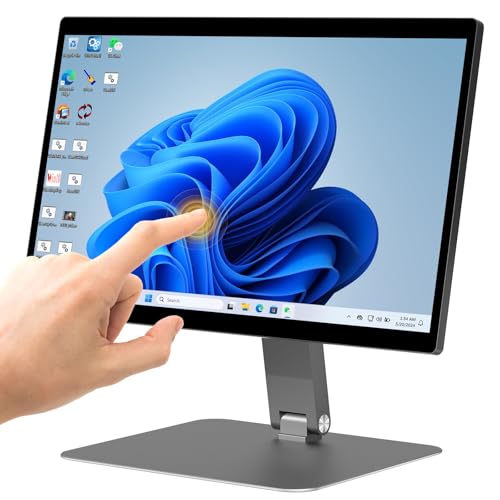
Best for: Office-to-automation kiosks requiring flexible display orientation and Windows 11 Pro. This 15.6-inch desktop PC integrates an N5095 processor, 8GB RAM, and 128GB storage with a 360°-adjustable screen, including a 180° fold option. It supports HDMI, USB, and wireless connectivity for versatile deployments.
- Why chosen: The rotating screen and flexible stand simplify demonstrations, training, and shared workstation use.
- Limitations: Larger footprint than some all-in-one options; ensure mount space and cable routing are planned.
HIGOLE 13.3 Inch Industrial Panel PC

Best for: Compact embedded solutions needing reliable performance in a sealed, rugged enclosure. The 13.3-inch panel PC uses a fanless N5095 with 8GB RAM and 128GB storage, providing solid processing with a durable, space-efficient chassis. The 1920×1080 display and 10-point touch support precise control in constrained environments.
- Why chosen: Small footprint with strong durability makes it ideal for cramped control panels or compact kiosks.
- Limitations: Smaller display may limit complex interfaces; pair with external displays if necessary.
OuuOee 21.5″ Android All-in-One Panel PC
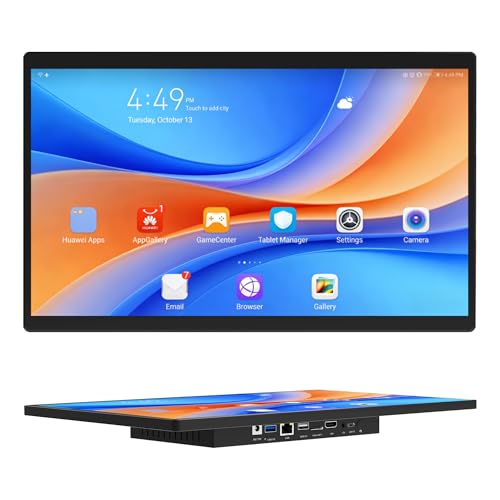
Best for: Large-format kiosks, digital signage, or control panels needing Android 12 and a bright, expansive 21.5-inch display. With 4GB RAM and 64GB ROM, this fanless unit offers reliable performance for multi-user demonstrations and straightforward touchscreen interactions.
- Why chosen: The large screen enhances visibility for public-facing displays and collaborative tasks.
- Limitations: Android may limit access to traditional Windows-based software; plan app deployment accordingly.
Buying Guide: Key Considerations for All-in-One Industrial PCs
- Operating System: Choose Windows 11 Pro for compatibility with specialized software and enterprise management, or Android 12 for quick deployment and touch-focused workflows.
- Processor and Memory: N5095-based units offer solid performance for light-to-moderate industrial tasks; 8GB RAM is standard for multitasking, with 128GB storage as a baseline. Increase RAM or storage if data-intensive tasks are expected.
- Display Size and Type: Larger panels improve visibility in shared workspaces or kiosks; IPS panels provide color accuracy and wide viewing angles. Consider 10-point touch for gloves or wet environments.
- Durability: Fanless designs reduce moving parts and dust intake. Look for wide operating temperature ranges, sealed enclosures, and rugged mounting options (VESA or wall mounts) to suit your environment.
- I/O and Connectivity: Check for USB 3.0, HDMI, Type-C, RS232, and Gigabit Ethernet to ensure compatibility with peripherals, sensors, and networks. Double-check whether RS232 ports meet your legacy equipment needs.
- Mounting and Form Factor: Wall, VESA, or desktop configurations affect placement. Consider rotation, tilt, or pivot features for demonstrations or operator ergonomics.
- Power and Reliability: 12V input is common in industrial panels. Power availability and redundancy considerations are essential for 24/7 operations.
Frequently Asked Questions
- What is the difference between Windows-based and Android-based industrial PCs?
– Windows offers broader software compatibility and enterprise management; Android provides quick deployment and simpler app ecosystems for touch-focused tasks. - Are all-in-one industrial PCs suitable for 24/7 operation?
– Many are designed for continuous operation, with fanless cooling and rugged enclosures; verify the specific model’s temperature range and MTBF data. - Can these devices replace separate desktops and POS terminals?
– Yes, many models are designed for kiosk, control room, and point-of-sale roles, combining display, input, and computing in one unit. - What ports should I prioritize for legacy equipment?
– RS232 ports, USB 3.0, HDMI, and Gigabit Ethernet are commonly needed; ensure the unit has the exact ports your equipment requires. - Is a larger screen always better for industrial work?
– Larger screens improve visibility for shared use, but they require more space and power; choose size based on operator workflow and environment. - What maintenance considerations exist for rugged panel PCs?
– Consider dust sealing, cooling design, and ease of component access when planning upgrades or repairs.
Add a Comment