Answering the search for a 5 DOF robotic arm that’s suitable for learning, coding, and hands-on projects, these five kits stand out for American buyers. They vary from Arduino-compatible to Raspberry Pi-friendly solutions and include ergonomic designs, clear tutorials, and programmable control methods. This guide helps buyers choose based on age, experience, and preferred control style.
Overview Table
- Adeept 5DOF Robotic Arm Kit (Arduino IDE) — Best for beginners who want straightforward Arduino integration and hands-on coding practice.
- Adeept 5-DOF Robotic Arm Kit (Raspberry Pi) — Best for teens and students using Python and Pi-based projects.
- Adeept 5-DOF Robotic Arm Kit (Orange variant, Raspberry Pi) — Best for students exploring Pi with web-based and joystick controls.
- LewanSoul 6DOF Robotic Arm Kit — Best for creative, multi-axis projects and school-scale robotics education.
- Gewbot 5-DOF Robotic Arm Kit (Arduino IDE) — Best for building confidence in stem robotics with OLED processing display.
Adeept 5DOF Robotic Arm Kit — Arduino IDE
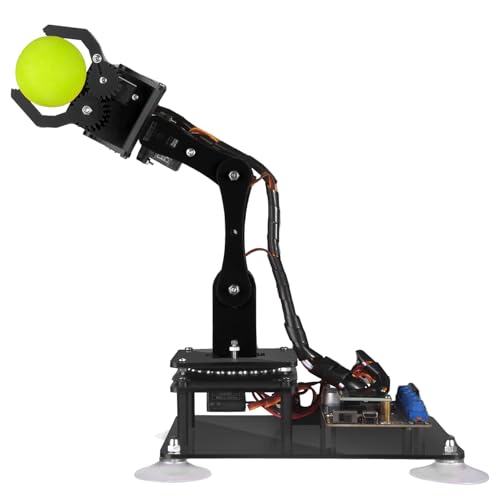
Best for beginners who want a clear entry into robot arm programming with Arduino IDE compatibility. This kit includes a detailed manual and a variety of Arduino code routines to practice engineering concepts like control loops, kinematics, and servo timing. It supports manual knob control on the driver board and a remote control option via PC software. The self-learning, drawing, and imitation features offer a balanced start for students and hobbyists.
Who this is for: Ideal for high school students, hobbyists, and teachers seeking an approachable entry into 5-axis robotics with tangible Arduino-based projects.
Why chosen: Combines accessible hardware with beginner-friendly software workflows and practical projects that demonstrate motion, control, and basic AI-like drawing capabilities.
Caution: Some users may prefer more software options beyond the bundled PC software for advanced control.
Adeept 5-DOF Robotic Arm Kit (Raspberry Pi 4/3 Series)

Best for teens and students who want Python-based control on Raspberry Pi. This kit is designed around Raspberry Pi compatibility (Pi 4B/3B/3B+/3A+) and is paired with Python code and tutorials. It supports multiple control methods, including a gamepad setup via Adeept PS2 joysticks and a web-based remote control interface. The Pi-centric approach helps learners connect coding with physical action in a familiar Python environment.
Who this is for: Students following a Raspberry Pi curriculum or hobbyists who prefer Python over Arduino for robotics.
Why chosen: It bridges Python programming with tangible robotics hardware, enabling broader software experimentation and remote control scenarios.
Caution: Requires a Raspberry Pi and setup work; ensure your Pi model and OS support the project software.
Adeept 5-DOF Robotic Arm Kit (Orange Pi Variant)
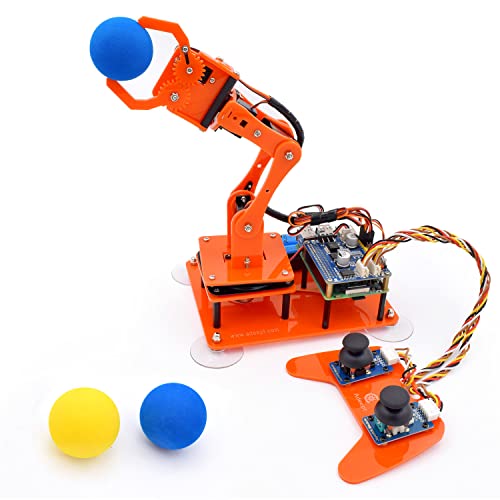
Best for teens who want a Raspberry Pi-based experience with an emphasis on coding and building. This orange variant aligns with Pi-integration and includes Python code and tutorials. Control methods include a web-based interface and gamepad-like remote control. It’s suited for projects that combine robotics with IoT-style remote operation and project-based learning.
Who this is for: Middle- to high-school students exploring Python robotics, IoT, and remote operation concepts.
Why chosen: Provides a different color variant and the same Pi-focused programming approach to broaden learner options.
LewanSoul 6DOF Robotic Arm Kit

Best for creative projects and school-level robotics education with greater axis flexibility. This 6DOF arm uses 6 high-quality servos, supports remote control and graphical programming, and includes a mechanical claw with anti-stall protection. The robust metal bracket structure promises stability for desk-top demonstrations and more complex motions. It’s a stronger option when you want more degrees of freedom for experimentation.
Who this is for: Classrooms or makerspaces seeking a more capable arm for demonstrations, storytelling robotics, and multi-step tasks.
Why chosen: The additional DOF and sturdy build expand potential projects beyond basic pick-and-place tasks.
Caution: It is a 6DOF model; ensure your learning targets align with the extra degree of freedom and associated control complexity.
Gewbot 5-DOF Robotic Arm Kit with OLED
Best for those who want an integrated OLED display to show status and code-generated output. This Gewbot kit emphasizes Arduino IDE compatibility, a guided coding workflow, and tutorials that cover 5-axis robotic arm control, self-learning features, and drawing capabilities. The OLED display is a practical inclusion for learners who want real-time feedback from their code.
Who this is for: Beginners and intermediate learners who value immediate visual feedback from an on-board display.
Why chosen: The OLED display adds a useful debugging and learning dimension, making it easier to see outcomes of code changes.
Caution: If you primarily want web-based control, this kit’s emphasis on on-board display may be less central to your workflow.
Buying Guide
- Control method preference: Choose based on whether you prefer Arduino IDE, Python on Raspberry Pi, or web-based/joystick remote control. Arduino-focused kits are often simpler for beginners, while Pi-based kits suit Python learners and more complex projects.
- Number of DOF: A 5-DOF kit handles basic multi-axis tasks; a 6-DOF kit (like LewanSoul) enables more complex motions and greater flexibility for advanced projects.
- Look for sturdy frames (metal brackets), reliable servos, and anti-stall protection for longevity and smooth operation in school or desk environments.
- Educational value: Prefer kits with detailed tutorials, sample projects (drawing, imitation, self-learning), and code samples to accelerate learning and understanding of robotics concepts.
- Expansion potential: Consider whether the kit supports ROS2 or other common interfaces for future projects and integration with other hardware or software.
- Age and experience alignment: Entry-level kits work well for younger students or beginners; more advanced kits suit teens and hobbyists with prior coding experience.
FAQ
- What is a DOF in robotic arms? DOF stands for degree of freedom, indicating the number of independent movements the arm can perform. More DOFs enable more complex tasks.
- Which kit is best for learning Python? The Adeept 5-DOF kit with Raspberry Pi compatibility is well-suited for Python-based projects and tutorials.
- Do these kits require extra parts? Some kits require additional components like batteries, especially for power and portability; always check the kit’s notes for what’s included.
- Are these kits suitable for classrooms? Yes, several kits are designed for educational use with clear tutorials and safe, desk-friendly dimensions.
- Can I upgrade or expand later? Many kits offer expansion through additional software interfaces or compatible hardware; verify the specific kit’s compatibility with ROS2 or other interfaces if expansion is a goal.
- Is 6DOF significantly harder than 5DOF? A 6DOF arm offers more possible movements but also adds control complexity; ensure the learner’s experience level matches the expanded capability.
Add a Comment