Looking for a capable 3D wood carving CNC machine that fits a hobbyist workflow? This guide highlights five beginner-to-intermediate desktop CNC routers that balance accuracy, usability, and expandability. Each option suits different project types, from small-detail engraving to larger wooden signs and panels. The top picks are organized to help makers decide which machine best matches their material, space, and upgrade plans. The buyer table below summarizes key factors for quick comparison.
| Product | Best For | Engraving Area | Upgrade Potential |
|---|---|---|---|
| FoxAlien Masuter Pro | Detail engraving, multi-material work | Compact to mid-size | High; spindle upgrades |
| VEVOR CNC Router Machine (300W) | Mid-sized projects, offline operation | 400 x 400 x 75 mm | Moderate; modular options |
| Genmitsu 3018-PRO | Beginner projects, plastics to soft woods | 300 x 180 x 45 mm | High; strong community support |
| Genmitsu PROVerXL 4030 | Serious hobbyists, larger pieces | 400 x 300 x 110 mm | Very high; full kit |
| Axiscreat CNC Router Machine 6060 | Larger, belt-driven work | 600 x 600 x 75 mm | High; robust frame |
FoxAlien Masuter Pro 3-Axis CNC Router

The FoxAlien Masuter Pro uses an all-metal framework with a linear rail Z-axis for enhanced precision and stability. It is best for hobbyists who work with wood, acrylic, MDF, nylon, and similar materials and who may upgrade to stronger spindles over time. The machine ships with two spindle clamps (52mm and 65mm) and supports upgrades like a 65mm router or a 1.5 kW spindle for more demanding carving tasks. This model is better for users who value rigidity and future expandability, and it includes a dust-protected controller for safer operation. A potential limitation is the complexity of upgrading spindles, which may require additional accessories bought separately.
VEVOR CNC Router Machine, 300W

This machine features a large engraving area (400 x 400 x 75 mm) and an offline 2.4-inch touchscreen controller that allows operation without a computer. The aluminum alloy construction provides good rigidity and stability for detailed work on wood, acrylic, MDF, PVC, and foam. It’s a solid pick for makers who want offline capability and a larger work area than entry-level units, though more advanced users may want to plan for occasional component upgrades to extend life and versatility.
Genmitsu CNC 3018-PRO Router Kit

The Genmitsu 3018-PRO is an upgraded version designed for easier assembly and improved accuracy. It uses Grbl control software and an accessible 20,000 RPM spindle, with Carveco Maker software included. It works well for beginners and hobbyists who want a straightforward setup and broad community support. Limitations include a smaller working area, which may require multiple passes for larger projects, and a dependency on external software for advanced design workflows.
Genmitsu PROVerXL 4030 CNC Router
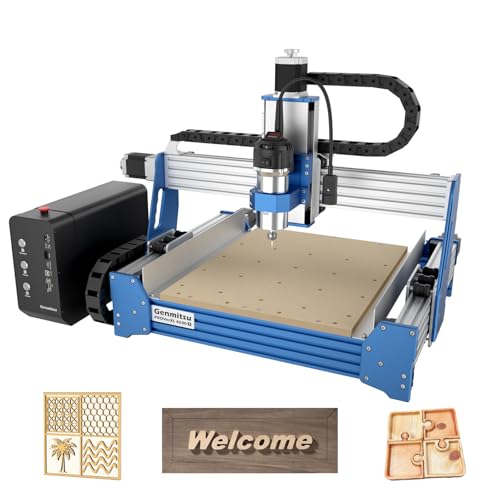
The PROVerXL 4030 brings industrial-grade stability with a reinforced Z-axis guide, a robust C-BEAM frame, and NEMA 23 motors. It ships with a high-power spindle and a ready-out-of-the-box package, including limit switches and Z-probe. Best for serious hobbyists and small studios, this model is designed for higher throughput and larger parts. A possible drawback is its larger footprint, which requires more workspace and careful layout planning.
Genmitsu PROVerXL 4030 Review (Second Gen)

The PROVerXL 4030 is designed for users who want a turnkey solution with extensive hardware and software support. It includes a pre-assembled XYZ axis, a Carveco Maker subscription, and a comprehensive out-of-the-box kit. Choose this if you want a higher level of convenience, robust performance, and ready integration with design software. The main constraint is the upfront cost and the space needed for a full-size desktop CNC router.
Axiscreat CNC Router Machine 6060
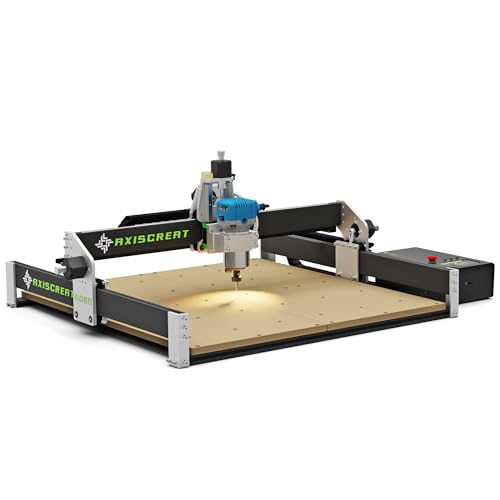
The Axiscreat 6060 emphasizes a larger 600 × 600 mm work area with a belt-driven X/Y axis and a linear rail Z axis. It uses a 710W spindle, offering strong cutting power for wood, acrylic, and MDF. This model is best for makers who regularly handle medium-to-large projects and want smoother, more stable motion. A potential limitation is belt-driven X/Y axes, which may require periodic tension checks to maintain precision on heavy workloads.
Buying Guide
What material and project size do you plan to work with?
Consider the largest material thickness you intend to carve and the typical workpiece size. Machines with higher Z-height and larger X/Y areas handle tall panels and larger signs more effectively.
How important is offline operation and software support?
Offline controllers provide flexibility when a computer isn’t handy. Software compatibility (Grbl, Carveco Maker, CAM options) affects ease of design-to-cut workflow and the availability of learning resources.
What about upgrade paths and future-proofing?
Look for machines that support stronger spindles, additional clamps, or expansion packages. A rigid frame and upgrade-ready spindle options extend the useful life of the machine as skills grow.
What is the right balance of price, performance, and space?
Entry-level models offer lower upfront costs and faster setup, while larger, more powerful units deliver higher throughput and versatility. Space and noise considerations are practical constraints in a home workshop.
What safety and maintenance considerations matter?
Dust control, emergency stops, and accessible wiring are important. Regular maintenance of belts, guide rails, and spindle cooling helps sustain accuracy and longevity.
FAQ
- What is the best CNC router for beginners? The Genmitsu 3018-PRO is widely favored for its simplicity, strong community support, and solid baseline performance.
- Can these machines cut metal? Most hobbyist units are optimized for wood, foam, plastics, and soft metals; always check spindle power and material compatibility before attempting metal cutting.
- Do I need software beyond what comes with the machine? For advanced designs, CAM software and file preparation tools are helpful. Many kits include Carveco Maker or Grbl-based software to start, with optional upgrades available.
- Is a larger work area always better? A larger bed increases flexibility for bigger parts but requires more space and a robust frame to maintain accuracy at size.
- How important are linear rails and Z-axis stability? High rigidity in the Z-axis and accurate linear guidance dramatically impact cut depth consistency and surface finish, especially at higher speeds.
- What maintenance tasks should I perform regularly? Check belt tension, clean dust and debris, inspect wiring, and ensure spindle cool-down periods to prevent overheating.
Add a Comment