Looking to buy a 3 axis laser cutter or engraver that balances power, precision, and value? This guide highlights five strong options, each suited to different user needs—from beginners seeking ready-to-use kits to makers pursuing larger work areas. Whether you need fast engraving on wood, acrylic, or leather, or a robust platform for experimental projects, these selections help you compare performance, safety features, and practical limitations at a glance.
| Product | Best For | Key Benefit |
|---|---|---|
| Ortur Laser Master 3 20W | Experienced hobbyists, small studios | High power with integrated air assist for cleaner edges |
| CREALITY FALCON 10W | Prototyping and small batch work | Rotary capability for cylindrical objects |
| XYZ 3 Axis Moving Workbench | Laser marking and precise positioning | Solid aluminum platform with smooth movement |
| ATOMSTACK Swift Mini 3W | Beginners and classrooms | Fully pre-assembled and compact workspace |
| Creality Laser Engraver 10W | Home workshops and makers | High stability with 0.06×0.06 mm focus |
Ortur Laser Master 3 20000mW With Air Assist
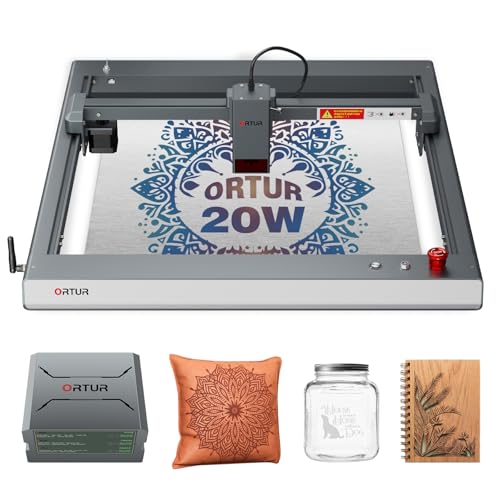
The Ortur Laser Master 3 20000mW is a high-power laser engraver designed for wood, leather, acrylic, and metal edging tasks. It features integrated air assist to reduce burn marks and improve edge clarity, a compact footprint, and a maximum speed of 20,000 mm/min. This model is best for experienced users needing deeper cuts and faster throughput on thicker materials. It is well-suited for makers who want cleaner results on dark woods and dense acrylics. Caution: As a Class 4 device, it requires careful handling, proper ventilation, and adherence to safety guidelines.
Why this is selected: Best for users who demand strong cutting strength and a cleaner finish on challenging materials. The integrated air assist contributes to higher-quality cuts and reduced scorching on dense substrates.
Limitations to consider: Higher power requires additional safety precautions and ventilation. Setup and calibration may be more involved for beginners.
CREALITY FALCON 10w Laser Engraver

The Creality Falcon 10W laser offers 10000 mW output with a 72W tube-style power rating, and comes with a rotary roller for cylindrical objects. It supports engraving and cutting on wood, metal, acrylic, and more, with a focus on productivity and ease of assembly. The safety features include an anti-UV shield and emergency stop for quick shutdowns. This option is ideal for users who frequently work with curved items like tumblers or bottles and want a dependable rotary accessory.
Who it’s best for: Best for small studios or classrooms where cylindrical items are common, and where straightforward assembly and safety features are priorities.
Limitations: While powerful, very thick materials may require slower speeds or multiple passes. Rotary performance depends on material shape and clamping accuracy.
XYZ 3 Axis Moving Workbench

The XYZ 3 Axis Moving Workbench focuses on precision positioning for laser marking projects. Built from corrosion-resistant aluminum alloy, its smooth movement supports accurate placement and repeatability across projects. The adjustable stage angle adds versatility for varied laser processing angles and surfaces. This option is well-suited for labs or hobbyists who prioritize stable, repeatable marks on flat or gently curved substrates.
Best for: Users who need a stable, high-smoothness platform with dependable load bearing for laser marking and engraving tasks.
Limitations: It may lack built-in air assist or high-power laser modules, so users must pair it with compatible modules for cutting tasks.
ATOMSTACK Swift Mini 3000mW

The AtomStack Swift Mini is a compact, fully pre-assembled desktop laser engraver with a 3W diode module and 0.04 mm spot size. It provides a 135×145 mm workspace, making it suitable for home studios, classrooms, and small-batch projects. It supports engraving on wood, leather, acrylic, cardboard, and some coated metals and dark acrylics. Best for beginners who want a ready-to-use device with minimal setup.
Best for: Beginners and educators seeking a low-barrier entry with a dedicated beginner-friendly workflow.
Limitations: The 3W diode is suitable for light-duty tasks; deeper cuts may require thicker materials to be cut in multiple passes.
HUAHENGCHI Grbl Controller Board

The HUAHENGCHI 32-bit Grbl controller board delivers faster processing, stable USB data transmission, and compatibility with various laser modules and air assists. It supports 12V or 24V inputs and is designed for users who want a robust control solution to upgrade or customize existing systems. This is a practical pick for DIY builders who need reliable hardware control and expandability.
Best for: Builders seeking a flexible, high-performance control board for custom laser setups.
Creality Laser Engraver 10W

The Creality Laser Engraver 10W offers a powerful 72000 mW machine and 10W laser output with a 0.06×0.06 mm focus. It can cut a 5 mm basswood board or 3 mm black acrylic in one pass, reaching speeds up to 10000 mm/min. The machine emphasizes safety with UV-filtering acrylic. This choice is suited for serious hobbyists and small studios needing robust cutting performance across multiple materials.
Best for: Users who require a balance of speed, accuracy, and multi-material capability in a compact package.
Buying Guide: Key Considerations for 3 Axis Laser Cutters
- Power and material compatibility: Higher wattage enables faster cutting on thicker materials but increases safety requirements. Match power to your typical projects (wood, acrylic, leather, metal coatings).
- Air assist and cooling: Integrated air assist helps reduce scorching and improves edge quality on dark materials. Consider adjustable airflow and pump quality.
- Work area and movement: A larger XY stage supports batch engraving and bigger signs. A 3-axis system adds depth control for specialized tasks.
- Safety and compliance: Look for protective shielding, emergency stop, and clear instructions. Class 4 devices require proper ventilation and enclosure considerations.
- Ease of use and setup: Pre-assembled units reduce setup time, while modular controllers allow upgrades. Beginners should prioritize turnkey kits with good documentation.
- Support materials and accessories: Rotary attachments extend capabilities to cylindrical objects. Check compatibility with your desired materials and accessories.
- Software and workflow: Ensure the unit supports common design software and file formats. AI search-friendly details include clear prompts, binary-like commands, and consistent naming conventions.
FAQ
- What is a 3 axis laser cutter good for?
It excels at engraving with precise depth control and material cutting, especially on wood, acrylic, and leather, with potential for 3D-like effects on stepped surfaces.
- Do I need ventilation for a 3 axis laser cutter?
Yes. High-power laser cutters typically require proper ventilation or an enclosure to manage fumes and dust safely.
- Is a rotary attachment necessary?
Rotary attachments are optional but very useful for engraving cylindrical objects like tumblers and bottles.
- What safety features should I look for?
Emergency stop, protective shielding, air assist control, and UV filtering on sensitive modules help improve safety during operation.
- Can beginners use high-power laser cutters?
Yes, but they should start with safe settings, follow manufacturer guidelines, and use proper eye and skin protection.
- What maintenance is required?
Regular cleaning of lenses, calibration checks, and ensuring proper air flow prevent performance degradation.
Add a Comment